Bill before US Congress: Pandemic Response & Opportunity Through National Service

A bill in the USA Congress, the Pandemic Response & Opportunity Through National Service Act, would expand AmeriCorps and SeniorCorps to aid in COVID-19 recovery efforts, including growing AmeriCorps to 750,000 positions over a three-year period; boost the AmeriCorps living stipend so that individuals regardless of financial situation can participate; increase the education award to cover up to two years of public university tuition; ramp up Senior Corps teleworking technology, and more. These programs are a part of the Corporation for National and Community Service.

More about the bill, from a group advocating support for such at this link: Support the Pandemic Response and Opportunity Through National Service Act.

Full disclosure: I have signed. I absolutely support this bill.

Also see:

If you have benefited from this blog or other parts of my web site and would like to support the time that went into researching information, developing material, preparing articles, updating pages, etc. (I receive no funding for this work), here is how you can help

Recruiting Volunteers To Serve in Difficult, Dangerous or Controversial Roles

There are people who want to volunteer in difficult or dangerous roles – it’s what they specifically seek out. Over on the Reddit group regarding voluntourism, as I write this blog, there are lots of messages from people, mostly young people, seeking to help on the “front lines” regarding people affected by COVID-19, either because they are ill or because they are isolated and needing help in lockdowns. Many online recruitment sites, like VolunteerMatch, have curated volunteering opportunities posted on their site that related to COVID-19 in some way, due to overwhelming demand from potential volunteers.

Some volunteering is perceived as difficult by potential volunteers and the general public, because of the clients that volunteers will work with or the kind of activities volunteers must undertake. Examples: serving as a Big Brother/Big Sister, mentoring a foster child, assisting adults with developmental disabilities, volunteering in a shelter for women experiencing domestic violence, or staffing a suicide hotline.

Some volunteering is perceived as difficult AND dangerous, such as fire fighting, search and rescue, volunteering with incarcerated people in a jail or prison or volunteering with people who are formerly-incarcerated.

Some volunteering is perceived as controversial, such as providing water stations in the desert for people entering a country illegally and can die from dehydration, or defending a women’s health clinic patients from protesters, or various protest and activism roles.

Difficult, dangerous and/or controversial roles actually appeal to many people who want to volunteer: they feel strongly about the cause, or they want to do something substantial and challenging. But other roles may seem too intimidating to new recruits, like mentoring a young person going through the foster care system, working with young people in the juvenile justice system, working with people with intellectual disabilities, or working with seniors.

How do you recruit for roles that might seem difficult, dangerous, even controversial? How do you recruit for a subject area or role that might provoke an initial reaction of fear among potential volunteers?

This web page, on my site, offers detailed advice.

Also see:

If you have benefited from this blog or other parts of my web site and would like to support the time that went into researching information, developing material, preparing articles, updating pages, etc. (I receive no funding for this work), here is how you can help

21 simple things to do while your programs are on hold during COVID-19 quarantines

WIth movement limited, public gatherings banned and so many people on home quarantine, many nonprofits, non-governmental organizations (NGOs), charities, government programs and other programs focused on helping or enhancing our communities or the environment are on hold. Some offices are closed entirely.

But there are LOTS of simple ways to use this “down” time that will benefit your program and make your program even stronger when physical distancing is no longer required. Many of these activities will help in fundraising efforts later.

Here are 21 ideas. Please add more in the comments:

  1. Make a list of your city, county, regional, state and national elected representatives and their contact info, if you don’t have it handy already. Going forward, you are going to always email these people about public events when your program starts having them again, and you are going to better advocate for your programs and all nonprofits, NGOs and charities as a result. An online volunteer could help you compile this info if you don’t have time.
  2. Make a list of all the off-site places your organization has held events, including meetings, classes and workshops, in the last few years. Put this list on a GoogleDoc or other shared space and ask staff and volunteers to comment on them in terms of what they liked about them, what they didn’t, etc. As a result, you have a robust database of event and meeting sites for the future.
  3. Make an archive of data you have always wanted to have handy: a list of every Executive Director your organization has ever had, or a list of every board member that has ever served, a list of every winner of a Volunteer-of-the-Year award you have given, a list of every major grant your program has ever had, etc. You can use past versions of your web site archived at the Internet Wayback Machine to access past info to the late 1990s (or ask a volunteer to do it). Such archives are great resources for institutional memory, to renew old contacts, to show your credibility, etc.
  4. Look over old versions of your web site at the Internet Wayback Machine and think about pages and resources your program has gotten rid of over the years that might need to be brought back and updated. This is a project multiple people can work on, including online volunteers.
  5. Find out the most-visited page on your web site, other than your home page. And what’s the second most-visited page? The third? What pages aren’t visited much, but should be? What can you do to make sure under-visited pages get noticed? Or should some pages be deleted per lack of interest, because they are so outdated, etc.? Compile this info and work with your web master or a volunteer to improve your site.
  6. Are your policies and procedures up-to-date regarding confidentiality, safety and sexual harassment, including in terms of online activities? Research the policies of similar programs (most will be happy to share them with you if they aren’t online already). Online volunteers can help with research.
  7. Define or revisit your organization or program’s Frequently Asked Questions (FAQs) and their answers. Documenting this helps new employees and volunteers and helps guide our web site design and communications strategies. The best person to define your program’s FAQs is the person who answers the phone and your main email account the most. Ask that person the top 10 – 20 reasons people call or stop by your organization or email your organization. Also ask this person to whom he or she transfers the most calls, and then talk to that person/persons as well, asking him/her/them what the top 10 reasons are that people call or email them.
  8. Do you have all of the information you should have on your web site for potential volunteers and for current volunteers? This is a great time to get your policies and procedures uploaded, an electronic version of your volunteer application posted (a volunteer can help you), photos of volunteers in action on the site, etc.
  9. Research Facebook groups and Reddit communities (subreddits) focused on your geographic area and think about how you could better leverage them in the future to promote your events, share new volunteering opportunities, share any messages meant to influence the public about an issue, etc.
  10. Create an online survey, or more than one: a survey to find out about the level of satisfaction of current volunteers (before lockdowns began) and where things can be improved, a survey of event attendees about what they would like to see in the future offered by your organization, etc.
  11. Create an online discussion group for your current volunteers. You can use GoogleGroups or https://groups.io/ for free. If you already have such an online discussion group, create a question or discussion of the week: How could our web site be better to represent what volunteers do at our organization? What’s the most challenging thing you’ve faced as a volunteer and how did you address that challenge? What’s a skill or talent you have that most people don’t know you have? Share a photo of you “in action” as a volunteer.
  12. Ask volunteers and clients to take a video of themselves on their smartphones or computers, something under one-minute, saying what your program has meant to them, why they think it’s valuable, etc. Tell them you will be using clips from these videos for a compilation video you will post on YouTube. Once you get enough footage, recruit a volunteer to knit these together, adding a title page, fade ins and outs, music, etc.
  13. Get your Twitter lists in order.
  14. Do you have raw footage of videos of events or training that aren’t shared with the public – but you wish you could do something with them? You could recruit volunteers to do things with such: make a one-minute or three-minute video with copyright-free music that offers program highlights, or to edit a video down to something that could be shared with the public.
  15. Add robust descriptions to your YouTube videos: name of the video, a summary of what it is, the full name of your organization, names of people featured in the video, a web address for more information, keywords/tags, etc. This will vastly improve the findability of these videos.
  16. Ask volunteers to caption your videos on YouTube so that people with hearing impairments and people who are in an environment where they cannot listen to them can experience them (YouTube will caption these automatically and then a volunteer can fix them).
  17. Ask volunteers to transcribe your program podcasts so people can read them (not everyone wants to listen to them).
  18. Ask volunteers to add alt text on all of your photos and graphics on your web site, making the site more accessible for people with sight impairments.
  19. Get rid of all “read more” and “click here” links on a web site, replacing them with descriptive links, so that the web site is more accessible for people with disabilities (you can ask a volunteer to do it if you don’t have time).
  20. Add appropriate titles in the title HTML for every page on your web site. This will improve Search Engine Optimization, improve accessibility for people with sight impairments, and means when someone types the URL (web address) of a web page into something like Quora, the correct title of the page will automatically show up.
  21. Take a deep dive into expanding virtual volunteering, exploring how to use the Internet to support ALL of your volunteers, including your traditional, onsite volunteers, is via The Last Virtual Volunteering Guidebook, which I wrote with Susan Ellis. It is the most comprehensive, detailed resource available regarding virtual volunteering, and a copy of my book is far cheaper than hiring me to do a workshop!

And a reminder that there has never been a better time for your organization to launch immediate activities and roles for online volunteers. How they could help you with the aforementioned activities should be obvious. Here are even more ideas, from my last blog.

If you have benefited from this blog or other parts of my web site and would like to support the time that went into researching information, developing material, preparing articles, updating pages, etc. (I receive no funding for this work), here is how you can help

Remote tools: what do I (Jayne) use?

It’s become a frequently asked question of me, since I have worked remotely, from home, for so many, many years, and because I work with so many colleagues, including volunteers, who are also working from home:

What do you use to work remotely with others?

Here’s how I do it – but note that everyone has different preferences and you may find that yours are quite different:

Google Docs / Google Drive has been a fantastic way for me to work with others on word processing documents, slide shows and spreadsheets. This way, it doesn’t matter what software we use for these functions (Microsoft, LibreOffice, whatever). Also, it’s free.

I have used WebEx, Go to Meeting and lots of other video-conferencing platforms – I’ll use whatever the client is paying for – but I love Zoom most: it is super easy for meetings. I like it because it’s so easy to share my screen or for another participants to do so. I can use it on my laptop AND my phone (in case I need to have a meeting when I won’t be at my laptop, which never leaves my house). No matter what you use, keep in mind:

  • meetings should have an agenda (and you stick to it)
  • meetings absolutely start and end on time
  • encourage everyone to keep their video on and to be “present”
  • do as much as you can to keep it lively and focused – treat participants as an audience
  • always use a password for access to meetings, so you don’t get “zoom bombed.”

If someone else is paying for access (I can’t afford it otherwise on my own), I love Slack for quick updates and conversations – I think of it as someone stopping by my office and saying, “Got a sec? I have a question.” If I have access to it, leave it on during the workday so people can reach me anytime, but use the “in a meeting” when I need to not be disturbed. I haven’t found a good alternative to Slack, now that YahooIM and AOL Messenger are gone. I refuse to use Facebook messenger – that company already knows way, way too much about me. WhatsApp is owned by Facebook.

If someone else is paying for it (again, I can’t afford it otherwise on my own), I also love Basecamp – Basecamp has been absolutely essential for me to manage large projects, like a recent one where I managed more than 15 projects, each with 3 – 5 volunteers, plus the overall program for these projects, with about 50 different people working on it. There are places to share files, or to link to files shared elsewhere, to group those files into categories, to do chats, and on and on. So much easier to find things there than to go looking for attachments to emails. I wish I could afford it to use all the time on every project I’m working on with others. It’s password-protected. Groups are private (you have to be invited by the owner of the group to join).

For those that can’t afford Basecamp, I recommend Groups.io. I’m experimenting with it myself, as an online discussion group, but it could also be an online collaboration space, including a place to share files – so much easier to find things there than to go looking for attachments to emails. I wish I could afford it to use all the time on every project I’m working on with others. Groups can be private and invite-only.

If I don’t care about security, I use DropBox to share large files with people that I don’t want to attach via email.

I have two Google calendars, one private and one public. I have my calendar set to send me email reminders 24 hours before especially important meetings, and 4 hours and 1 hour before other meetings. It also sends me an on-screen reminder on my laptop 30 minutes before a meeting and an update on my phone. I also use the alarm function on my phone – not affiliated with Google – to remind me of particularly important meetings.

In the last year, I have found short videos to be a really easy way to orient or pitch something to remote staff or potential clients. I use Quicktime to record the video (it’s already on my computer, comes for free with a Mac) to record the video and iMovie to edit it (also free on my laptop). I had no training in either – I taught myself. In 2018, I did a video to encourage about 20 nonprofits I was working with to make a simple, short video of their own for a project I was working on, and it went over WAY better than an email! I got 100% participation, and I think it was because I showed them exactly what I wanted, instead of telling them. Since then, I’ve created several quick online videos, including three specifically because of the onslaught of interest in virtual volunteering because of COVID-19 home quarantines:

NOTE: Don’t be afraid to use video – to train new volunteers, to remind current volunteers of something they need to keep in mind, to talk about anything, really, that can be summarized in a compelling little speech of around 5 minutes. Your sound is as important as the image – you need to be CLEAR and as interesting to someone who would just be listening to the video as also watching it. And, absolutely, close-caption your video (YouTube does this automatically, for free – then you go in and fix what it got wrong).

As for safety and security: I do not like to share any document online that has my social security and/or birthday on it. But sometimes, I just have no choice. In such cases, I prefer to scan the document as a PDF or JPG and send it as an attachment via email. If I have to sign something, I have a printed and I print it out, sign it, then scan it again and send that as a JPG or PDF.

I subscribe to a VPN – a tool that creates a “virtual private network.” A VPN ensures that the information traveling between a connected device (computer, smartphone, tablet) and the VPN’s server is encrypted, making it more secure from hackers, cybercriminals, and data thieves. It’s a great tool if you ever use a public wi-fi network – at a coffee shop, the airport, the library, etc. As an added bonus, usig a VPN, you can also access restricted websites and apps from anywhere in the world – great to get around blocks on a website when you are outside your country (no more “not available in your country” messages). I recommend Hot Spot Shield (the free version has a lot of ads – it’s worth the monthly subscription fee not to have these).

If you have benefited from this blog or other parts of my web site and would like to support the time that went into researching information, developing material, preparing articles, updating pages, etc. (I receive no funding for this work), here is how you can help

Three resources for your COVID-19-related volunteering

Lots of nonprofits, charities, government programs and others are rapidly re-aligning their volunteer engagement because of COVID-19 and home quarantines:

  • Converting some programming and volunteer engagement online.
  • Launching new virtual “home visit” or online mentoring programs.
  • Mobilizing volunteers to support people in-need because of home quarantine, because of the stress of their professional work in response to the pandemic, etc.

Here are three resources for these new or re-imagined efforts:

(1) This short video about the importance of safety measures in any virtual volunteering programs, including virtual “home visits”, virtual visits to those in senior homes, etc. Spoiler alert: it’s my video.

(2) After a natural disaster – earthquake, flood, tornado, hurricane, etc. – affected areas can be flooded with spontaneous volunteers. They present a lot of challenges – and even dangers. COVID-19 is presenting a similar flood of spontaneous volunteers. How to deal with that flood of goodwill? These resources on dealing with spontaneous volunteers in natural disasters can offer some guidance.

(3) These recommendations regarding volunteers in post-disaster situations (hurricanes, tornadoes, earthquakes, etc.) from Chapter 5: Discussion, Conclusions, and Recommendations, in Disaster Survivors’ Experiences with Disaster Volunteers by Christa Frances Lopez / Christa López Sandelier (it’s her doctoral dissertation for Walden University).

Except:

The data from the findings confirm that disaster survivors had positive and negative interactions with the disaster volunteers. The disaster survivors weighted the positive experiences over the negative experiences. Participant 8 stated that she did not want to talk about the negative experiences, while another was very specific about concerns about the disaster volunteers’ skill levels and fitness for working in the climate in Texas. There were several recommendations for training of disaster volunteers with a clear expression from the research participants that stopping to listen and have clear communication with the disaster survivors was a high priority, as stated by Participant 1, “Listen to the people.” While Participant 3 stated, “just know that the people that you’re working for or they’re in a bad place and you’re there to make it better and always remember, to smile.” Participant 6 mentioned,

It depends on the tenure or the experience of the group coming in. Whereas you have other folks who just have a heart and they show up and mistakes do come out of those, they walk into situations- working on projects that weren’t priorities like trees down in yards when other houses had trees fallen on roofs into bedrooms. And so that kind of misstep of a volunteer coming to do good being directed by the homeowner as opposed to being directed by a group. I saw a lot of that happen because people show up, they don’t know where to go. They end up getting questioned in by a group of neighbors that are out front. Well, there needs to be a leader of each group who has some knowledge of construction or safety.

This emphasized the need for effective volunteer coordination with focus on organization and leadership for the established volunteer groups and the emerging volunteers so that work can be prioritized….

The cultural fit using Campinha-Bacote’s (2002) model of culture competence may be best applied in the future at the volunteer reception centers where coordinators of the volunteers could provide training before the volunteers go into the field to work. This training could involve an intake assessment that asks questions about the volunteer and their reasons and intent for coming to volunteer for that particular disaster. This would help volunteers look inward and fit within the first construct of cultural awareness. The questionnaire could then build upon the next construct of cultural knowledge by asking what the volunteer knows about the community. That could then lead into the topics the volunteer center can focus on for the volunteers’ training before they work in the field. During this training there can be a brief on the culture of the community, such as, what the community was like before the disaster, what is like now, including stages of grief the disaster survivors may be experiencing and other information pertinent to the local community…

As mentioned in the recommendations, using Campinha-Bacote’s (2002) model of culture competence may be best applied in the future at the volunteer reception centers where coordinators of the volunteers could provide training before the volunteers go into the field to work. This training could involve an intake assessment, as well, to assess the volunteer motivation to gauge their culture awareness by looking inward at their own self-awareness as to what motivates them to volunteer. The training could then provide information about the local community norms and provide cultural knowledge to the volunteers so that they can know who they are serving, and thus improve service and cultural integration of the volunteers within the community…

(end excerpt)

your nonprofit is still relevant during COVID19 – SHOW HOW

If you are a nonprofit focused on helping the homeless, addressing hunger or nutrition, helping people with a chronic illness or children or seniors, helping people with addiction issues, your services are still hugely in demand and it’s easy for people to see how your nonprofit is relevant during COVID19 and all that it’s bringing to individuals and the community-at-large, like unemployment, social isolation and being homebound without onsite visits. I’ve noticed many nonprofits trying to address domestic violence have done an excellent job at messaging these days, noting that the requirements to stay at home have created a very dangerous scenario for those they try to serve and what they are trying to do to address that. If you represent such a nonprofit, you may even have seen a spike in donations as a result.

But if you are a nonprofit focused on live theater, artwork, dance, history, recycling or some other thing that isn’t directly, obviously related to the consequences of COVID19, it can feel like you are being lost amid all the calls for continuing to support nonprofits and addressing this pandemic.

ALL NONPROFIT ORGANIZATIONS MATTER to SOMEONE, at the very least. If a nonprofit doesn’t matter, it shouldn’t exist.

This is not the time to pause your nonprofit’s communications, wait for things to get better and hope people will remember your nonprofit when we’re through this, or to think that relaunching your public activities once public gatherings can happen again will immediately bring people back to engaging with your program and supporting it financially. Instead, your nonprofit, no matter its focus, needs to be thinking about what messages it can send out on its blog and social media channels, linked from its web site, about its work that will be relevant in these times. It needs to strategize about how to get those messages out and how to invite digital engagement on them as well.

Here are some ideas:

  • Historical societies and history museums need to be posting about what the culture or community they are focused on did in the past regarding an epidemic, a pandemic or other widespread hardship, with photos, any first-person stories they have on file or accounts by others. Did your city experience the so-called Spanish Flu and, if so, what happened in that time? Share stories of hope, courage, sorry, and with each message, remind people what your organization does to preserve local culture. This doesn’t have to be one major online publication – you can publish just one thing once a week, even twice a week. Always invite feedback on such – some people may have photos and diaries they would like to share with you from that time.
  • Historical societies should be finding free broadcasts of history-related topics (such as on public television) and encouraging home-based live-watch parties, and for everyone in their own community that’s watching to share thoughts as they watch on a Facebook thread or Tweet chat designed for them to share such. At least some of these quotes will demonstrate the power of learning about history and be great in a grant proposal.
  • History societies and groups focused on specific ethnic cultures should be sharing how people can get started on their own family history and ancestry projects: how to ask for info from family members, how to record that information (scanning, how to use a smart phone to record, etc.,), options for sharing that information with just family, or with the public, etc.
  • Community theaters should be posting stories about places and pieces related to any discussion of disease, or noting the ways past epidemics or pandemics have affected live theater in the past. Share these stories with the intent to say, “And live theater SURVIVED!” A group of online volunteers, recruited from your current home-bound volunteers or newly recruited, could help you compile enough information to share something every week – even twice a week. Maybe even every day.
  • There are art museums that are having a field day with social media during this crisis, such as the Getty, which has asked people to recreate famous painting scenes using whatever they can find in their own house. Check out a few of the Getty’s picks on its Instagram, and don’t forget to take a peek this hashtag. It’s a campaign that’s not only gone viral, it’s reminded people of just how images from art influence our lives and kept that museum relevant.
  • Operas could post people performing songs in operas, like La Traviata or La bohème, where a character is singing while dying and talk about how the performing arts have never flinched from portraying human suffering, and how that art can help people handle the horrors around them.
  • All performing arts groups – theaters, operas, dance companies, choirs, etc. – should be finding free broadcasts of performances by ANY group related to whatever art they themselves produce and encouraging home-based live-watch parties, and for everyone in their own community that’s watching to share thoughts as they watch on a Facebook thread or Tweet chat designed for them to share such. At least some of these quotes will demonstrate the power of performing art and be great in a grant proposal.
  • All arts groups should be posting messages regularly now about the links between producing art and experiencing art and the positive effects on such regarding mental health.
  • A nonprofit that produces a farmer’s market or artisan market should ask its clients to make short videos about what they are doing now – both challenges they are facing and what they are still producing and ways people might be able to order it online or pay for it in a safe exchange that involves a lot of physical distancing and no close contact whatsoever.
  • Many animal shelters and rescue agencies have done a brilliant job promoting now as a great time to foster an animal from the shelter, since families and individuals are homebound anyway, and it’s resulted in a windfall of great foster families for many shelters.
  • If your nonprofit promotes sports, the outdoors or an outdoor activity, this is a time to be interviewing people online who have benefited from your programs over the years, and sharing those stories online, to say, “This is why sports / this activity matters. This is how we have impact.” If you don’t need to do fundraising for activities, you could fundraise for equipment you will use once your operations resume. You could also be sharing with people how to clean and repair whatever equipment is associated with the sport or outdoor activity, or an at-home exercise that could help build strength or balance to help in engaging in that sport or outdoor activity.

Your volunteers would love to come up with their own ideas about what your nonprofit should be saying and doing to stay relevant now. You can bring them all together in a conference call or put one volunteer in charge of gathering their ideas, calling and emailing each one. Emailing is great – but calling someone is even better, in most scenarios. This doesn’t have to be a one-time ask: they should be given multiple opportunities to share their ideas with you, and opportunities to help bring those ideas to fruition.

Always invite feedback on what you are sharing, and track this feedback. You can use this to show the impact of your COVID19-related activities to potential funders.

And a reminder that there has never been a better time for your organization to launch activities and roles for online volunteers. How they could help you with the aforementioned activities should be obvious. Here are even more ideas, from my last blog.

If you have benefited from this blog or other parts of my web site and would like to support the time that went into researching information, developing material, preparing articles, updating pages, etc. (I receive no funding for this work), here is how you can help

How to Immediately Introduce Virtual Volunteering at Your Program (How to Involve Online Volunteers Right Away)

(Original title: “NEVER a better time to explore Virtual Volunteering than NOW”)

The precautions being taken in communities around the world may feel like we are becoming more isolated from each other. Virtual volunteering is a fantastic way to bring us all closer together and fill our home-based time with meaningful activities that make a difference.

In this time of home quarantine and in-person social physical distancing because of COVID19, there has NEVER been a better time for your program to quickly create online tasks and roles for your volunteers – you need the volunteers and they need you! There are so many things volunteers could be doing for you, right now, to help your program and clients, without any investment in new systems or equipment.

The longest list you will find anywhere of online tasks and roles for online volunteers is here on the list of examples at the Virtual Volunteering Wiki, which is updated regularly.

In particular, it’s a great time for your volunteers to get busy right away and:

  • caption your videos on YouTube so that people with hearing impairments and people who are in an environment where they cannot listen to them can experience them.
  • transcribe your program podcasts so people can read them (many people prefer reading to listening, and it also improves search engine optimization).
  • edit a video or podcast one of your staff has recorded from their home office, adding titles, intro music, etc.
  • beta test your new online orientation for new volunteers that will, eventually, work onsite (which you have been working on all this time so that volunteers don’t have to come onsite for that orientation – RIGHT?!?).
  • put appropriate keyword tags on your photos on Flickr or some other online photo archive.
  • brainstorm social media messages for a variety of platforms (Facebook, Twitter, Instagram, etc.) based on your program’s messaging goals.
  • create new pages for your web site.
  • put appropriate alt text on all of your photos and graphics on your web site, making the site more accessible for people with sight impairments.
  • get rid of all “read more” and “click here” links on a web site, replacing them with descriptive links, so that the web site is more accessible for people with disabilities.
  • make sure every page on your web site has an appropriate title in the title tag (this helps with SEO and the title automatically appears in many sites whenever someone types in the URL).
  • monitor the news to look for specific subjects your program needs to be aware of.
  • monitor Quora, Reddit or other popular online communities, to answer questions on a particular subject or about a particular organization, to refer people to a web site that will answer their questions, to counter fake news/misinformation on a particular subject, etc.
  • translate documents (and proofreading the translations by others).
  • November 19, 2020 updates:
  • look at Reddit and make a list of subreddits – online communities – where you should post information about volunteering, events, or educational/awareness messages. See if the volunteers that undertake this task come up with the same list.
  • interview the person who answers the main email and phone the most, and the person he or she transfers the most calls to or forwards the most emails to, and find out what the program’s Frequently Asked Questions (and their answers) are, then recruit a volunteer to prepare such as a new web page for your web site.
  • transcribe text you have in PDFs on your web site to text, for new web pages or to add to current web pages (this makes the content accessible for people with disabilities and improves your search engine optimization).
  • add titles, or make appropriate titles on every page of your web site (in between the <title> and </title> tags in the HTML). This helps with their accessibility for people with disabilities.
  • fill out your YouTube video descriptions completely with the full name of your organization, the content of the video, keywords and a link to your web site.
  • create lists on Twitter.
  • compile and prepare information for your organization’s web site that shows your organization’s credibility and accountability.
  • evaluate your web site in terms of the information about and for volunteers that is and isn’t there.

You don’t need any special training to have your current volunteers, already-vetted volunteers engage in these aforementioned virtual volunteering activities – just send them the list of possibilities and ask them if they know how to do any of them!

This is also great time for you to start strategizing to be even more ambitious regarding virtual volunteering at your nonprofit, non-governmental organization (NGO), charity, government program or school. What about:

  • Having a lead volunteer organize a survey of other volunteers to find out how they view success and challenges at your organization in volunteering so far? The data gathered could reveal successes and problems with your volunteer engagement you didn’t know you had and provide critical data to make improvements and to include in grant proposals.
  • Asking volunteers to take selfie videos describing what they like about volunteering with you, and then recruiting an online volunteer to edit these together into a celebration video of your volunteers? The result would be a fantastic volunteer recruitment and recognition tool – and create a tradition you should do annually, even without a pandemic lockdown.
  • Exploring tutoring or mentoring students regarding homework, writing assignments, online safety, professional development? If your program serves young people in some way, this could be a terrific extension of your services.
  • Ask volunteers to look through Wikipedia and make a list of pages that you think should mention or cite your organization, or that your organization could improve. If you are a historical society, are all the pages regarding your local area as detailed as they could be regarding local history? If you are an environmental group serving a region, do pages regarding local geography note information about flora, fauna and environmental issues? After volunteers and staff compile pages you think should be updated, create a work plan with volunteers on how this will happen.
  • Is there a way that a single employee or volunteer could be onsite inside your facility, isolated from everyone else, to scan photos and other documents you have on file? The resulting scans could be shared online, on Flickr, for instance, and your online volunteers could then properly describe and tag them. This can help better document your program’s history, which further establishes your institutional credibility and better celebrates past employees, volunteers and donors.
  • Revisit your staff policies. Do you need to expand policies regarding online safety, use of social media or confidentiality? Many of your volunteers would love to re-read policies, research those of other organizations, and then meet together online to make recommendations.
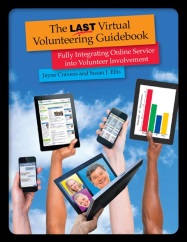
cover of Virtual Volunteering book with hands raising up various Internet connected devices

An easy, affordable way for you to take a deep dive into expanding virtual volunteering at your organization and exploring how to use the Internet to support ALL of your volunteers, including your traditional, onsite volunteers, is via The Last Virtual Volunteering Guidebook, which I wrote with Susan Ellis. It is the most comprehensive, detailed resource available regarding virtual volunteering, and a copy of my book is far cheaper than hiring me to do a workshop! There are just 120 print copies left and I would love for you to have one – or more! You can buy the book directly from me. Virtual volunteering is a practice that’s more than 30 years old, and the suggestions in this book are time tested – and were just tested recently in an intense project involving more than 150 online volunteers!

Are you someone that wants to engage in volunteering from home? If you don’t already have a relationship with a program that you can contact about doing the aforementioned activities, check out this list of sources for virtual volunteering – the most comprehensive you will find anywhere.

April 8, 2020 Update: I have a new video making an urgent plea regarding a mistake many reporters, bloggers, nonprofits and others are making in talking about virtual volunteering. The video is about four-minutes long.

April 13, 2020 Update: Another new video! I lead virtual volunteering workshops in the 1990s & got big pushback from nonprofits asserting that an online program could never be safe. Now, many programs are launching brand new virtual volunteering programs, bringing online volunteers together with people in senior living homes, or with teens, and on and on. And that change is great, however, these programs need to think about safety! My newest video has more info and is about five-minutes long.

August 11, 2020 Update: I added more ideas under “strategizing to be even more ambitious regarding virtual volunteering.”

If you have benefited from this blog or other parts of my web site or my YouTube videos and would like to support the time that went into researching information, developing material, preparing articles, updating pages, etc. (I receive no funding for this work), here is how you can help

Blog on hiatus while I’m in Mexico

For most of March, I will be on a road trip via motorcycle all the way through Baja, California in Mexico, top to bottom and back.

Therefore, I’ll be taking a break from blogging for a few weeks. I also won’t be working, so as this blog is moderated, no new comments will be posted until I’m back and can moderate them. I have no idea how often I will have Internet access but I’m guessing it will NOT be often – so I hope that, if you need to reach me, it can wait until the end of March!

In addition, I will not be able to fill orders for The Last Virtual Volunteering Guidebook while I am gone.

If you have benefited from this blog or other parts of my web site and would like to support the time that went into researching information, developing material, preparing articles, updating pages, etc. (I receive no funding for this work), here is how you can help

Saying “no” to recruiting volunteers for certain tasks

Volunteer recruitment has always been easy for me. Often, when I post an assignment to a third-party platform like VolunteerMatch on behalf of whatever nonprofit I’m working for, I end up having to take it down two days later, because I get plenty of candidates to choose from.

I try to craft volunteer roles in a way that will benefit the volunteer (enhance or show-off skills, give them an opportunity to be involved directly in a cause, maybe even have fun). I also am explicit about why the task is important to the organization and those we serve. And I’m detailed in the role description of exactly what the expectations are in terms of time commitment and deadlines.

I also almost always get to make a commitment to involving volunteers in my work at a nonprofit – if I’m working for a nonprofit that already involves volunteers. I don’t involve volunteers in my work because “I have all this work to do and I can’t afford an assistant.” I do it because I think volunteers might be the best people for a task – like when I need more neutral eyes, when I need people who might be more critical in surveying participants or in reviewing the data they are compiling than a paid person. I do it because I think non-staff should get to see how a nonprofit works in a transparent, first-hand way – and I think those people turn into amazing advocates back out in the communities around the organization.

Sometimes, other staff see these volunteers involved in my work and are inspired to involve more volunteers in their work too. But they often just see “free labor” and want to treat VolunteerMatch like Task Rabbit: we’ve got work to do, let’s find someone to do it – for free!

I once had a staff person ask if I would recruit a new volunteer for her to serve food and then clean up after a breakfast meeting. I said no. At this particular organization, I believed strongly that every volunteering opportunity should include an emphasis on the volunteer learning what the nonprofit did, who it served and why the nonprofit was needed. Serving food and washing dishes didn’t do that. I also felt like involving volunteers in this way would contribute to the idea that so many staff members have at that organization: volunteers are free and do stuff we don’t want to do. I also didn’t like the idea of board members thinking of the “other” volunteers as merely waitresses and dishwashers.

It’s not a black or white issue: if someone contacted me and said, “I urgently need volunteering hours for court-ordered community service,” I might offer them that waitressing and dishwashing volunteer gig, knowing how hard it is for them to get the hours they need, but I would also offer all the other volunteering opportunities we have available as well and, if the volunteer was qualified, consider them for other, more significant roles too.

If this was a big fundraising event for the nonprofit, I might feel differently about having volunteers staffing the coat check, making sure there is plenty of coffee and helping clean up – but I would recruit the event-support volunteers from the ranks of our current volunteers, and those volunteers would be identified to all attendees: “We want to let you know that the staff you see here helping you all have a great experience here tonight are some of our volunteers. These are the volunteers who work with our clients, work on our web site, edit videos for us, research grants for us, etc. They are students, web designers, lawyers, job seekers, etc. They are here tonight, as volunteers, to further show their support for our organization and we encourage you to talk to them about what they do as volunteers for our organization.”

Why am I so concerned with the appropriateness of volunteer roles? The titles alone on these blogs and web pages that I have written should explain why – but if they don’t, then you’ll need to read them:

If you have benefited from this blog or other parts of my web site and would like to support the time that went into researching information, developing material, preparing articles, updating pages, etc. (I receive no funding for this work), here is how you can help

Too much text on the web? Bollocks

I have always believed content drives design for any communications product, from a paper brochure to a website. What good is a supposedly “well designed” or “eye-catching” poster, billboard, flyer, manual or website if it doesn’t get the result you want – and the result is not just people looking at it and saying, “Oh, what a lovely design,” but what they DO and how they THINK after experiencing that product.

I will never forget being handed a company brochure at a nonprofit where I had just started and being told, “It won a design award!” I looked it over and said, “The text is too small for someone who needs glasses to read and dark green text on a light green background makes it really hard for ME to read as well.” I didn’t last long at that job…

Then there was the designer who so proudly presented me with his design for an upcoming event, and it was beautiful, but it was missing the date, the time and the location of the event, and it implied the event would be something that it wasn’t. But, hey, it was pretty! He was crushed when I told him he had to add the necessary info. “But… it ruins the design…” he sighed…

And then there was the nonprofit that decided it wanted to delete at least half the text off of its web site. It did so, resulting in an onslaught of email from people asking for more information, and me having to constantly cut and paste, over and over, the information that used to be on the web site.

My attitude about text – about the importance of clarity and completeness over just brevity for brevity’s sake – puts me at odds with many a designer. But it recently put me at odds with people who believe “too much text intimidates young people” and, therefore, you should cut down on the number of pages on your web site.

Bollocks.

Yes, I get it – most people don’t read everything on a web site. That has ALWAYS been true. I have always known people don’t go to a website and read it like a book – they go to a website, read the home page, and if they are enticed, or in need of certain information, they click on something and read more.

What’s great about the web is that you can create a site that appeals to BOTH of those groups of information consumers, those who just need a bit of info, and those who want to dive deeper.

Also, people often go to a web site not as a fresh, new visitor who need something shiny waved at them to be intrigued – there are those that go to a web site looking for specific details. They may be a current volunteer who wants to get clarification regarding the purpose of your organization’s community engagement. They may be someone who wants to understand more about why the issue your nonprofit addresses exists at all. They may be someone who is doing a reference check on someone claiming to be on your board. It may be a CURRENT STAFF MEMBER who wants to stay on brand/message, and to do that, needs to know what the official wording is regarding some program or practice.

How many times have I joined an organization as a new employee or consultant and my only source for vital historical information I need is the organization’s web site? And how many times has the organization not had that vital information on their new, shiny, modern, streamlined website, so I have to go find it on an old version of their site on the Internet Wayback Machine?

Absolutely, when someone opens a web page, they shouldn’t feel overwhelmed. Some are overwhelmed by lots of text. I’m overwhelmed by lots of photos – because I rarely go to a web site for photos, I go for information, and I feel like I’m lost in a sea of images and I search for real, actual information I need.

The philosophy is to put JUST enough information on a web page to get people to sign up for an event, put JUST enough to get people to buy a ticket. I get that. And, certainly, for landing pages, it’s a good philosophy. But there are many users who are going to need more information. So why not have a link to more information so people like me, who are NOT going to buy that ticket or sign up to volunteer based on just a paragraph or two, can dive deeper? Believe me, there is PLENTY of room on your web site for that additional information. There is plenty of room on the web for more web pages.

One last note: I have once again been in a position to create tasks for volunteers and then to recruit and involve volunteers in those positions. I tried the less-is-more for role descriptions – and ended up with an endless number of questions from volunteers, asking for all those details I was leaving out of my pithy recruitment posts. Lesson learned: I went back to long-form.

If you have benefited from this blog, my other blogs, or other parts of my web site and would like to support the time that went into researching information, developing material, preparing articles, updating pages, etc. (I receive no funding for this work), here is how you can help