Category Archives: Tech Tools

Wearables for Good Challenge by UNICEF

The Apple Watch, the Fitbit, Google Glass and many other wearable tech are luxuries for tech-savvy consumers. But could wearable tech be used for diagnosing deadly diseases, monitoring pregnant mothers’ health, tracking air quality, alerting people with “push notifications” or warning of an earthquake’s early vibrations?

UNICEF, in partnership with the microprocessor company ARM and the design firm Frog, is hosting the Wearables for Good Challenge. Blair Palmer, innovation lab lead at UNICEF, says in this summary story from DevEx that UNICEF’s interest in convening the challenge is to “ask these questions and provoke the industry and people to think differently on a global level and not just have these things come out of Silicon Valley. The wearables challenge seeks applications that can provide low-power, unintrusive, highly durable solutions in low-income settings, and many sensor technologies fit that bill. Close to 1 billion more people are expected to come online by 2017, and UNICEF is taking note, Palmer said.

The challenge is now closed to applications. The challenge has garnered 250 submissions from 46 countries across 6 continents, with nearly 2000 registrations from 65 countries. 10 finalists have been selected. Each finalist will then be assigned to work with 1-2 coaches during 2 calendar weeks (10-28 September). Coaches will provide feedback to finalists in order to help hone their ideas for final submission. The challenge partners will award $15,000 to two winning proposals for wearable and sensor products with social impact potential. The winners will be announced by November 2015.

A summary of the finalists:

Communic-AID: A wearable device that facilitates record keeping, aids in the tracking of medications that have been distributed in a post-disaster context and allows the patient to take part in their treatment.

Droplet: a wearable water purification device in the form of a bracelet, to make safe drinking water available to everyone

GuardBand: a system that helps protect children from abuse and observes their health.

Khushi Baby: a wearable platform to bridge the world’s immunization gap is a system for tracking vaccination and mobilization in the last mile.

Raksh: named after the Sanskrit word “safeguard,” this is a low cost (25$) bluetooth-based, ear-worn multi-parameter monitoring platform.

SoaPen: a wearable and portable soap re-designed to encourage hand washing amongst young children to reduce the risk of catching and spreading disease thereby increasing their lifespan.

teleScrypts: seeks to solve the challenge of providing health care workers with advanced healthcare technology in low resource communities at a low cost.

TermoTell: a real time temperature monitor and alert system, designed to save the lives of children under five at risk of Malaria.

Totem Open Health: an open platform and ecosystem for wearable health technology, including: sensors, data collection, storage, sharing, analysis and algorithmic interpretation.

WAAA!: Wearable, Anytime, Anywhere, Apgar is a mobile phone, text-based surveillance service that systematically transmits live APGAR data via soft patch sensors located on a newborn baby.

Follow #WEARABLESFORGOOD and @UNICEFinnovate on Twitter for updates about this and other similar campaigns.

Principles for Digital Development – one that’s missing

digitalprinciplesThe Principles for Digital Development were developed per the efforts of individuals, international and local development organizations, including non-governmental organizations (NGOs) and nonprofits, and donors who have wanted to improve the use and promotion of information and communication technologies (ICTs) in development projects. The Principles for Digital Development were created in consultation with The Bill and Melinda Gates Foundation, the Omidiyar Foundation, the Swedish International Development Agency (SIDA), the United Nations’ Children’s Fund (UNICEF), the UN Development Program (UNDP), UN Global Pulse, the UN Fund for Population Assistance (UNFPA), the UN High Commission for Refugees (UNHCR), the UN Office for the Coordination of Humanitarian Affairs (OCHA), UN Women, the World Bank, the World Food Program (WFP), the U.S. Agency for International Development (USAID), the U.S. Department of State, and the World Health Organization (WHO).

For instance, principle 1 is design with the user. The description says, “Too often in the field of international development technology tools are created, or tech-enabled projects are designed, without sufficient input from the stakeholders whose engagement and ownership are critical to long-term success.” The design with the user principle provides recommendations to avoid this.

You can download this one page Principles for Digital Development flyer and post it (for instance, post it in your office for any visitor to see), include it in an information packet, etc.

Tweets about this initiative use the tag #digitalprinciples

The only thing missing? Something very significant: a principle regarding equal access: regarding accessibility for people with disabilities and people using assistive technologies, regarding ensuring that women and girls have full access to ICT resources developed (in a harassment-free, intimidation-free environment), regarding access by minority groups to resources developed, etc.

Also see:

  • Women’s Access to Public Internet Access, resources and ideas to support the development of women-only Internet centers/technology centers/etc., or women-only hours at such public Internet access points, in developing and transitional countries, to ensure a harassment-free, intimidation-free environment.
  • Archive of the United Nations Information Technology Service (UNITeS) , a global initiative to help bridge the digital divide, one of the first UN initiatives on the subject (maybe the first?). UNITeS both supported volunteers applying information and communications technologies for development (ICT4D) and promoted volunteerism as a fundamental element of successful ICT4D initiatives. UNITeS was launched in 2000 by then UN Secretary General Kofi Annan.


A “Yelp” or “Angie’s List” for Migrants – to avoid exploitation

Contratados.org launched in October, 2014 as a resource for workers—mostly from Mexico—to anonymously rate the employers and recruiters who bring them to the USA for temporary jobs under the H-2B, H-2A, and J-1 visa programs. It bills itself as “the Yelp for migrant workers.”

Migrants working legally in the USA on temporary visas can end up as virtual slaves. They can’t change jobs, they’re often paid less than minimum wage for 80 or more hours a week, and they can’t usually return to the U.S. to sue their employer in court—there’s no visa program for that.

Most migrants do not have smartphones, so designers created the Contratados.org website so it could also be accessed like voice mail. Much of migrants’ internet access is done in internet cafes which charge a few pesos an hour for fairly slow web service, and that meant the videos originally envisioned to be a part of the site were scrapped—too much bandwidth. Also scrapped was an interactive map of the players in the employment side of the equation—although such a map and database can be found in another section of the organization’s website. (It was built from public documents in order to help legislators understand what is happening in the migrant labor program.)

What did get into contratados.org are audio novelas—short dramas telling workers what to watch out for, what to expect, and who to contact in case of trouble as they uproot their lives to try to make a living here doing seasonal work. And they can listen to information about their rights and follow along with comic-book-style illustrations.

Full story at Baltimore’s CityPaper.

Wildlife Crime (prevention/response) Tech Challenge

As demand for products from wildlife has skyrocketed, criminal networks and corrupt officials exploit porous borders and weak institutions to profit from wildlife trafficking. These syndicates are more organized, sophisticated, and technologically advanced than ever before.

Are you a mobile developer, conservation biologist, engineer, forensic scientist, social media analyst, or entrepreneur with a great idea? USAID’s Wildlife Crime Tech Challenge will reward the most innovative science and technology solutions—at any stage of innovation, from anywhere in the world, and from all areas of expertise—that can be scaled to address one or more of the four issues identified on the page: detect transit routes, strengthen forensic evidence, reduce consumer demand, tackle corruption.

Follow on Twitter at @wildlife_tech

Call for papers for FOSDEM: Free & Open Source Software Developers’ European Meeting

Call for papers for the Conference: FOSDEM 2015 Conference, which will be held in February 2015 in Brussels, Belgium
Paper deadline: 1 December 2014

FOSDEM is a Free and Open Source Software (FOSS) Developers’ European Meeting, a free and non-commercial two-day weekend event that offers open source contributors a place to meet, share ideas and collaborate. This year, there will be a design devroom at FOSDEM: a full day of talks around design work on free, libre and open source projects. The Open Source Design devroom will be Sunday, February 1st.

“We mean ‘design’ in the broadest sense, from user research, to interface and interaction design, typography, and usability testing – all in the context of open source projects, which we believe introduces unique challenges.”

It is quite likely that the talks in the Open Source Design devroom will be audio and video recorded. By submitting a proposal you consent to be recorded and agree to license the content of your talk under a Creative Commons Attribution (CC BY) license.

Submissions should be for a 30-minute presentation, with 15 minutes for questions and discussion. All submissions are made in the Pentabarf event planning tool. When submitting your talk in Pentabarf, make sure to select the ‘Open source design devroom’ as the ‘Track’. If you already have a Pentabarf account from a previous year, please reuse it: create an account if, and only if, you don’t have one from a previous year. If you have any issues with Pentabarf, do not despair: contact belenbarrospena at gmail dot com

UN innovation events show how far they’ve come re: ICT4D

The change is stunning. And welcomed.

Back in 2001, my first year working as an employee of the United Nations, I was a part of a little department of six people (and various interns over the years) within UNDP/UN Volunteers, managing two projects: the Online Volunteering service (then part of NetAid) and the Secretary General’s United Nations Information Technology Service (UNITeS). Our team could not have been more excited to talk about virtual volunteering, technology for development (ICT4D), ICT4D projects by volunteers in the field, handheld computer technologies in community service/volunteering/advocacy, citizen-designed tech solutions, using tech to work with remote volunteers, crowd-sourcing for development (though we didn’t call it that then), south-to-south knowledge exchange ONLINE, hacks 4 social change (though we didn’t call it then), and other tech4good activities to anyone who would listen! It was an incredible four years of my life.

Unfortunately, many of our UN colleagues never understood our projects – or our boundless enthusiasm for such. Despite our events, workshops, one-on-one meetings, online resources, singing and dancing, drums, support from the Secretary General, Kofi Annan, whatever else we could think of, our activities were met with eye rolls by many of our colleagues. By the time I left that assignment, the new head of UNV (now long-gone) was proudly proclaiming that most of our initiative’s activities, save the online volunteering service, were finished – not because they had met their goals, but because they weren’t needed, and never had been. Even the UNITeS web site was taken off-line for a few months (hence why I keep a version here). Our team went its separate ways.

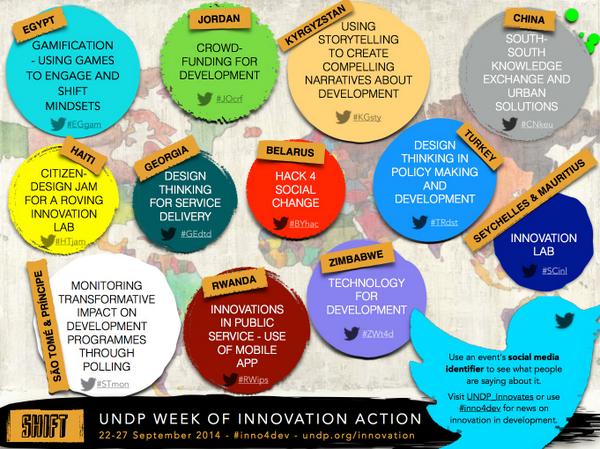
UNDP innovation logoNow, 13 years after we came together in Bonn, Germany and tried to get the rest of the UN excited about our crazy ideas, and nine years after most of our activities were ended, it’s fascinating to see UNDP in particular fully embracing those ideas: The UNDP SHIFT campaign, focused on innovation (and many of the ideas we tried to promote back at the start of the century – see graphic at left), is the week of 22 September 2014, headquartered in New York City (the “Social Good” summit) but happening all over the world, including here in Kyiv, Ukraine (details soon!).

We can’t take any credit for this change happening, of course. But my colleagues can feel good to know that we weren’t quite as crazy as people thought we were – we we really were on to something worth pursuing by the UN. We were just a decade or so early!

(although… we were pretty crazy…)

Somewhere, Sharon Capeling-Alakija is smiling.

where are the evaluations of hacksforgood/appsforgood?

Just found this out: the city council of Ivano-Frankivsk, a municipality in Western Ukraine, initiated a project for the creation of a mobile app to improve service delivery and expand opportunities for collecting the public’s feedback. On 18 January 2014, UNDP help to launch the app, making it available for free on Google Play. “Containing information about the city, its executive authorities, and a useful telephone directory of 500 contacts of relevant public authorities, the app also provides easy access to municipal emergency services. Crucially, it also allows citizens to report cases of corruption via 14 different anti-corruption hotlines at local, regional, and national levels. The claims and petitions filed will be addressed within the legally established timeframe of 30-45 days.” Here’s the official story from UNDP Europe and Central Asia.

Ukraine really is quite a tech-savvy country – as I mentioned earlier, re: the late Ukrainian journalist Ihor Kostenko, who was killed earlier this year in a Euromaidan protest, being named Wikipedian of the Year for 2014. And, as you may recall, I blogged earlier about the development of a citizen reporting system for post-conflict areas in Ukraine, one that could be accessed by a computer or a smart phone, where citizens could report on a particular issue, and these reports could be mapped and shared, etc.

But with all that said, just as with app launches and hackathons / hacks4good in the USA, there seems to be no followup. Are any of these apps4good projects sustainable? Are there more users of the apps now? How many cases of corruption have been reported to date with this particular app that was launched earlier this year? Has the app – or any apps six months later – been improved in any way? Has any hackathon products or apps4good had any evaluation yet and, if so, what are the results?

I’ve been trying to find examples of citizen reporting apps being used by governments to respond to citizen reports – about illegal waste dumps, infrastructure issues, misuse of official vehicles, whatever, in any country. And so far… I’m finding only stories about the launch of the app. Like this one in Montenegro. In addition to getting answers to the questions in the aforementioned paragraph about all these apps for good, I’d like to read a success story about the government being responsive to the data generated. It seems to me some of the requirements for this to happen would be:

  • the government designating an office and at least one staff position as being responsible for reading every submission, evaluating it, passing it on to the appropriate people for action, and following up to make sure action was taken – and if not, getting back to the reporting citizens as to why not.
  • the office and staff people assigned to be responsible for reading and responding to the data generated by the citizen reporting app being evaluated regarding their performance in responding to the information, and that evaluation being made public.

I did hear of one project in Kyiv, where citizens can report housing problems via a web site, and, according to the person that referred such to me, it is actually working: “There is a system that a person leaves a request (reports a problem), the housing department employee checks it, and fixes the problem and reports back on it.” So it seems to be working exactly because it’s addressed the two aforementioned bullet points – or, as my colleague put it, “such a system can work only with local authorities, who will implement the projects, and have access to the ground, and resources.”

It’s wonderful to see so many tech4good / apps4good / hacks4good initiatives anywhere in the world, Ukraine or otherwise, but I fear we’re spending all our attention on their launch, and not nearly enough on their impact and sustainability. And if we don’t focus on those things, then they are just tech fluff.

Greetings from Ukraine.

Apps for good – two things I learned in Ukraine this week

This week, I sat in on a presentation by a tech company here in Ukraine regarding the development of a citizen reporting system – one that could be accessed by a computer or a smart phone, where citizens could report on a particular issue, and these reports could be mapped and shared, etc. You’re probably familiar with these in other countries: where citizens can report pot holes, infrastructure problems after a disaster, incidents of corruption, incidents of street harassment, etc. Like in Chilé or Egypt.

The presentation was the best I’ve ever sat through on this topic, better than anything I have ever experienced in the USA.

Why?

The vendor used the language of the UN – and used it with real familiarity. He didn’t try to use some new snazzy jargon that’s big in the IT world now to talk about ideas we all understand: goals, clients, etc. In other words: he respected the audience to whom he was speaking as experts, and demonstrated that respect by being well-versed in the words they use and how they communicate. So, for instance, the representative talked about people’s capacities and the time and expertise needed by his staff to develop the tool – he didn’t substitute the word “bandwidth” for that.

He also talked to us, making eye contact, without constantly turning to his computer to show something shiny or colorful or otherwise just distracting. His slide show presentation was just background. He was there to connect, to help us understand. He was human – for a very human project. He completely understood that this isn’t a tech project – it’s a civic engagement project.

What a different experience it is to be in a meeting like this. Seven years ago, in 2007, no one talked about such a tool in Afghanistan in the government office where I was working, supported by UNDP – despite these tools already existing, despite the permeation of cell phones throughout the country, despite the golden opportunity to use such a tool in some way. Using tech in the field, even in the most remote of areas, to gather information and report it back somewhere in a centralized place as a part of humanitarian, environmental or other aid or development-related efforts has been a phenomena since before the new millennium – I wrote one of the first papers reporting on such efforts, for the UN, published online in October 2001. Back then, the UN yawned. I’m so glad things have changed!

Another great day on the job in Ukraine. Less than seven weeks to go.

UK Government adopts Open Doc Format for all sharable docs

The Government of United Kingdom has adopted Open Document Format (ODF) for all sharable documents. That means government offices and employees must use PDF/A or HTML for documents that are to be just viewed (but not edited), and ODF for sharing and collaborating on gov docs.

It doesn’t meant that anyone has to give up Microsoft Office, but it does mean that, when creating a file in that office suite, it has to be saved in an ODF format:

.odt and .fodt for word processing (text) documents
.ods and .fods for spreadsheets
.odp and .fodp for presentations
.odb for databases
.odg and .fodg for graphics
.odf for formulae, mathematical equations

If any of those employees are, like me, using open-source office suites as LibreOffice and OpenOffice, they can stop having to save files as .doc (Word), .ppt (PowerPoint) and .xls (Excel).

From the ZDNet article: “All office-suite programs, which do not support ODF, such as Google Docs, must add support for the standard. Without it, they will find themselves unable to compete for UK government business now. And, in the future, they may find themselves unable to compete for other office contracts that will require ODF.”

Now, if I could just convince the United Nations, and all of the NGOs and nonprofits I work with, and all the local government offices in the USA, to do the same…

What to do with old/vintage software.

Welcome to one of the most popular blogs I have ever written. It’s popularity is because of the subject, right there in the title: people want to know what to do with old and vintage software, as much as they want to know what to do with old hardware, and this blog that you are reading now is what comes up when they look online.

But the original contents of this blog were published in February 2014. That was a thousand years ago, in terms of tech.

I’ve kept the original text of the blog here – you can get to it if you scroll down. But note that it is woefully out of date, and most of the links don’t work anymore.

Here are two things to add to the original blog:

Goodwill or a Habitat ReStore MIGHT take your software IF the store has a tech section and IF the person that accepts donations at that store sees a value in the software. Go to the store yourself and look for a section selling tech, and if there isn’t one, they are probably NOT going to take it.

If there is no market for the software, check with your local government’s environmental or waste management office to see if they have a way of disposing of the disks or books in an environmentally-responsible manner.

Below is the original blog, published 9 February 2014.

I’m betting you have a shelf or drawer full of old software that won’t work on your computer – and hasn’t for YEARS. You’ve got disks, you’ve got books, but it’s all completely unusable, and has been a long time. What are your options for out-of-date software that will no longer work on any computer or device you have because of a change/upgrade in operating systems, other than throwing it away? And do user agreements mean you have to just throw it away?

First, let me say that this blog is not a legal document and I’m not offering you legal advice. I’m presenting you research I’ve done and what it means to me. If you are that worried about being sued by a company for reselling software, you should stop reading now – and destroy the software before throwing it away, period.

There is NOT an ultimate legal agreement regarding reselling software. There’s not even agreement from software companies about reselling software. For instance, Adobe says “if you upgrade from Adobe Acrobat 6 to Acrobat 7, you cannot sell Acrobat 6 to someone else. If you purchase a new license, rather than upgrade your old software, you are permitted to transfer your old license. That is, as long as you did not purchase the original license with a volume licensing arrangement.” But in the case of Vernor v. Autodesk, the courts said that because Autodesk had said, explicitly, that old software had to be destroyed – that Vernor never owned it, merely licensed it – he was not allowed to resell it. One wonders if Vernor had thrown the software into the trash, and someone had retrieved it and started using it, rather than Vernor trying to sell it on eBay, if Autodesk could have sued Vernor for not truly destroying the software.

So, before you sell old software

  • Search for legal cases concerning that software on Google or Bing. If you see a case where the manufacturer of that software has sued a reseller, destroy the software and then throw the software away.
  • Make CERTAIN it is truly vintage, as in version you have is NOT available for purchase from the original software manufacturer, is no longer supported by the company, and is NOT available from BestBuy or other resellers; also, that it does not work with the current Mac or Windows operating systems.

Once you’ve met that benchmark:

  • Look to see if the version you have is being sold on eBay or Craigslist. If it is being sold by others, you will probably be safe doing it as well.
  • Put all the original disks and books together. Old software is of more use when the original documentation is available.
  • If there is detailed information online about this vintage software, such as on Wikipedia or a tribute page, link to it on any online information you post, and be detailed about what the software will work on – and what it will NOT work on – in terms of hardware and operating systems.
  • Try eBay and Craigslist for reselling.
  • I’m uncertain about using social media for this – I’d hate for you to attract attention for an overzealous lawyer who doesn’t understand that what you are selling is no longer supported by the company and no longer works on modern hardware or operating systems.
  • If you want to donate the software, try Craigslist, your social media accounts, any freecycle-type online forum or group in your community, and clubs for vintage computers. Note if you are willing to mail the software and pay those postage costs yourself. ook to see if there are nonprofits in your area that accept donations of old software, like FreeGeek in Portland, Oregon. Goodwill might take it. World Computer Exchange might take it.
  • Take your items to a local swap meet and hope for the best.
  • Look for a working vintage computer that the software would work on, buy it and set it up in your house with your vintage software as a conversation piece or a play thing.

This web page, EMS Old Software Exchange, says it buys and sells “the world’s largest selection of old/used/out-of-print software for the PC and other microcomputers.” But I can’t tell if it’s still in operation. And note that it has info on how to find out if your user agreement forbids you reselling a particular software tool.

Here’s the wikipedia entry for abandonware.

Also see: Shout out to nonprofit efforts to refurbish computers.

Also see my page on how I use my lime green clam shell iBook, bought in 2000. It also has advice on using these old Apple laptops that I’ve found from various sources online. Unfortunately, as of 2013, I can no longer get online with this device.

What’s your advice for selling or donating used, old software? And have you ever looked for older versions of software for a vintage computer that you use?

This article is the second most popular entry on my blog. If you have benefited from this blog or other parts of my web site or my YouTube videos and would like to support the time that went into researching information, developing material, preparing articles, updating pages, paying for this web site to be hosted, etc. (I receive no funding for this work), here is how you can help.