Category Archives: Tech Tools

Pioneering in “hacks for good”: Knowbility

Hackathons, hacks for good, hackfests or codefests are quite the buzz words these days.

There are a lot of new initiatives getting a lot of attention for mobilizing people with high tech skills to help various causes at individual events: these initiatives bring these people together to spend the day, or maybe a few days in a week, at computers, usually in one big room, with everyone using their skills to do good, eat some good food, take lots of fun photos of everyone in action, and celebrate the great work at the end of the day.

Good stuff. But one of the first organizations to do this, Knowbility, gets lost amongst the much better-funded, higher profile newcomer groups, and it’s such a shame, because more people really should get to know Knowbility!
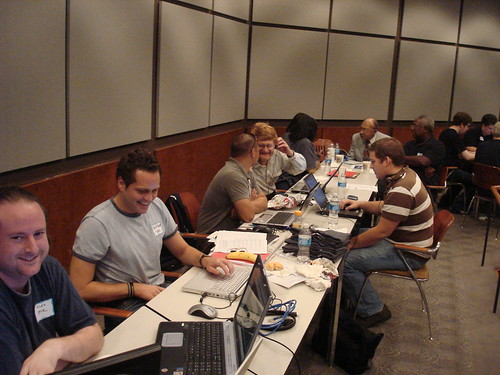
AIR Houston 2007

Knowbility is a national nonprofit organization based in Austin, Texas that creates technology programs that support independent living for people with disabilities, including veterans. Knowbility’s signature event is its Accessibility Internet Rally (AIR) – a hackathon that brings together teams of web designers to learn about web design accessibility standards, and then to apply those standards in a competition to create web sites for nonprofit organizations. The result of an AIR event isn’t just a fun day and new web sites; all participants walk away with an understanding of web design accessibility standards they didn’t have before that they can apply to their daily professional work, and the volunteer teams, most of them from the corporate sector, learn about the unique work of nonprofit organizations, creating opportunities for better partnerships in the future.

Knowbility’s activities have earned all sorts of awards and recognition – like the Peter F. Drucker Foundation Recognition for Nonprofit Innovation. On September 21, 2000, the White House issued a press release to highlight programs across the country that are helping to bridge the digital divide for people with disabilities and Knowbility’s AIR event in Colorado was mentioned by President Clinton as a new and noteworthy initiative. And I’ll never forget when they got mentioned at the end of Oprah’s talk show, resulting in an onslaught of emails and phone calls and oh-so-much excitement.

Knowbility earns more than 60% of its revenue through fee-for-service offerings. But that means it still relies heavily on grants and donations. Knowbility is worth your financial support. I really want this organization to continue – more than that, I actually want this organization to launch more AIR events and other activities all over the USA, and beyond! Knowbility is worth your investment.

And if you have ever been involved with Knowbility in any way, consider blogging about your expereince, talking about it on your Facebook status update or Twitter feed or Google Plus profile or other social media profile, and linking to the donation page.

Here are some other blogs I’ve written about Knowbility:
Hackathons for good? That’s volunteering!

Volunteer online & make web sites accessible

what’s most important about software experience

Back in the mid 1990s, when I found myself jobless and was temping, my agency sent me to fill in for an executive administrative assistant that was going on vacation for two weeks. I read over the job description, and it said I needed to know Microsoft Powerpoint. I looked at the recruiter and said, “Oh, I haven’t used this much. I’ve used Aldus Persuasion for slide show presentations.” She shook her head and said, “Same thing. You know that, you’ll do fine with PowerPoint.” I went to the job terrified they’d boot me as soon as they figured out that I didn’t know Powerpoint. But the recruiter was right: it was most important that I knew how to lay out a slide show presentation properly; I figured out PowerPoint in just a few minutes, and put together slide show presentations for two weeks per the company’s specifications.

I’ve taken one software class in my life: it was for a new version of Aldus Pagemaker (oh, how I loved Aldus products back in the 1990s!). The class was all about how you did things differently in this version versus the last version – but it didn’t teach me anything about design. And during that hour-long class, I realized I could have figured everything out about the upgrade on my own – a book about the upgrade would have been cheaper, and always there, ready for reference.

I bring this up because of a discussion on an online community where someone said they were from a nonprofit that didn’t have the money to upgrade to the latest version of Microsoft Office, a very old version of which they used to train their clients regarding how to prepare résumés, write formal correspondence, create simple business documents, etc. I responded that a great alternative for this nonprofit was OpenOffice or LibreOffice, both of which are free, both of which provide very powerful word processing, slide show/presentation, spreadsheet and database software, both of which are frequently updated, etc. I use OpenOffice myself.

Other people thought that the advice was outrageous, that if this nonprofit were to use anything but Microsoft, it would handicap their clients. But I stand by my advice: what’s important is not to teach someone how to use Microsoft Word or Microsoft anything. What’s important is for people to understand all that office software can do, such as in a document:

  • using fonts appropriately
  • setting tabs and margins
  • creating and editing tables
  • adding headers and footers
  • recording and showing, or hiding or accepting, edits by other people
  • creating mail merges
  • etc.

What’s MOST important is that you understand the capabilities of word processing software, spreadsheet software, presentation software, web page creation software, etc. – having that understanding means you will be able to learn to use future versions of the software or most any software produced by a different company that is designed to do what you want done, whether it’s to create a document or a web page or a database, whatever.

I bring this up not only because of that online community debate, but also because I see so many job postings asking just for advanced experience with Excel – rather than asking for experience with creating calculations on spreadsheets or producing a variety of graphs using statistical data. Or someone asking for experience with such-and-such database instead of asking for experience creating fields or customized reports in a database.

Another software skill that is just as important: ability to learn new functions on upgraded software or ability to learn new software quickly or ability to figure out new software/upgrades, because software changes. And changes and changes. It gets upgraded. The IT manager decides to use something different. The price gets too high and some board member can get a special deal on something different.

Give me a nimble learner over someone with 10 years of experience with ANY one software package! Give me a person who understands the basics of document design who has used a typesetter and hot wax for the past 20 years over someone who knows how to use Microsoft PowerPoint to create really ugly slide show presentations!

Also see:

Embrace FOSS and Open Source

Fear of Wrestling

You probably won’t hear any well-known social media guru talking about it, you probably won’t hear about it in any social media workshop (except mine, of course), but do you know who is getting the MOST out of social media when it comes to community engagement?

Wrestlers.

Check out 110 Trending Topics in 5 Hours: How WWE Wrestlemania Body-Slammed Social Media:

Behind strong pushes on Twitter and YouTube, WWE Wrestlemania XXVIII laid the smack down on social media last weekend, teaching a digital engagement lesson to the sports entertainment world.

Heck, Wrestlemania taught a digital engagement lesson to the nonprofit world, to ANY world, if those sectors will listen. Also see: How the WWE Is Making WrestleMania More Social Than Ever.

But will you click on those links? Or are you already lifting up your nose at the mere mention of the word wrestling?

Professional wrestling – or, as my people like to call it, rasslin’ – is unbelievably popular world wide. I’ve been stunned at how many wrestling shirts I’ve seen all over the world, including in Kabul, Afghanistan. In Kabul, there are (or, at least, in 2007, there were) gyms in the city that had the images of wrestlers from Wrestlemania in front of their businesses to draw people in (don’t sue, Wrestlemania, just don’t). I couldn’t understand why USAID wasn’t employing stars from Wrestlemania to create public service announcements for Afghans about whatever it is we’re trying to get Afghans to do (support women in microenterprises, support girls going to school, grow wheat instead of poppies, drive on the right side of the road, employ proper water sanitation practices, etc.). I’m totally serious, USAID!

But we cringe at the thought of… sniff… wrestlers being involved in anything noble or high-minded or community-focused like that.

I worked with People Magazine once upon a time to do a pilot online mentoring program with kids in Washington, D.C. – and the People folks wanted celebrities to be the online mentors. At a classroom we visited in the basement of a school (where it was easily over 100 degrees on that stifling hot day), there were probably five kids wearing Wrestlemania t-shirts. I talked to the kids while the rest of our visiting party stood across the room, as far away from the students as possible, and when I asked the students what kind of celebrities they admired, they didn’t name rap stars – they named wrestlers. I was thinking, hey great, we’re getting wrestlers for these kids as online mentors! Later that afternoon, in our followup planning meeting in an air-conditioned room of a then dominant Internet provider in Virginia, a room so cold I needed a sweater, People Magazine staff balked at the idea of wrestlers. They said they were thinking of celebrities such as Martha Stewart and Charleton Heston as possible mentors for these teens. I kid you not – that’s the two people they named in that meeting as examples of proper online mentors for inner-city teens.

It’s worth noting that the first virtual volunteering by a celebrity I have been able to find has been by…  A RETIRED WRESTLER. Mick Foley is a an online volunteer with RAINN (Rape, Abuse & Incest National Network), the largest anti-sexual assault organization in the USA. He talked about his experience as an online volunteer on a November 2010 episode of The Daily Show with John Stewart. In a RAINN web video, Foley says, “I cannot think of a better way to spend a few hours a week than helping someone who needs RAINN’s services.” Learn more about volunteering for RAINN’s Online Hotline.

(Yes, I just burned a bridge with People Magazine. So much for my bid to be one of their most beautiful people. Ah, well.)

Let’s be clear: I actually don’t watch wrestling. Well, now, anyway – when I was 8, I loved watching Bill “Superstar” Dundee on TV. I also loved roller derby in those days. But, indeed, I have moved on. I could not name a modern-day wrestler. I’m not as hip as you might think.

But I haven’t become too sophisticated to say, way to go, Wrestlemania. I’ll happily learn from Wrestlemania and wrestlers when it comes to virtual volunteering, online mentoring, and online community engagement, I’d love to invite your participation in any community engagement activity I’m a part of, and I’ll even use examples of your online activities in my workshops – even while other social media experts and nonprofit management trainers rolls their eyes and cringe.

But I still might call it rasslin’.

Consulting services by Jayne Cravens.


My Twitter Lists

One of the things I really like about Twitter is that I don’t have to follow absolutely everyone whose tweets I might be interested in reading at some point; I can put people and organizations on various lists, by subject matter, geography, whatever, and then check in with those lists as I like. I pick one or two of my lists a day, and then spend a few minutes going through the tweets of that list.

I make my Twitter lists public – anyone can see them. I’m also sharing them below – I thought you might like to see what they are, either to find someone you should be following, to subscribe to any of these lists or maybe to finally get you on Twitter at long last.

Afghanistan
People and organizations that tweet about Afghanistan. I’ll always care about Afghanistan…

Aid work & Dev
Organizations working development, aid and humanitarian response in developing/transitional countries.

CSR
Corporate social responsibility and social entrepreneurship, including pro bono help

Colleagues
My professional and volunteering colleagues (if you aren’t on this list, and we’ve worked together at some point in some way, and you are on Twitter, please let me know!)

español
Info & orgs in Spain & Latin America, or any site I follow that tweets in español, all related to some subject I follow (aid work and development, tech4good/ICT4D, tourism for good, CSR, FOSS, etc.)

FOSS
Free and Open Source Software (FOSS) – vendors, distributors, volunteers and advocates.

International NGOs
Major international non-governmental organizations I’m particularly interested in.

Nonprofit associations
City, state & regional nonprofit associations in the USA.

PNW
Portland, Oregon & Pacifc Northwest Tweeters I follow.

Tech4Good ICT4D
Also #nptech, apps for good. Organizations and individuals engaged in activities that use computer, software and Internet technology to help individuals, communities and the environment.

tourism4good
Organizations promoting tourism for good, or tourism for development.

Women & Girls Empowerment
Orgs & tweeters re women & girls empowerment/rights

Vol Research
Research regarding volunteerism and/or community engagement

Volunteerism non-English
Volunteer info & orgs that do not tweet English (but tweet in Spanish, French, Portuguese, or anything I can sorta kinda figure out)

For Volunteers
If you want to / are a volunteer. If you tweet about your volunteering activities, the things you do as a volunteer, contact me and let me know. If you are an organization focused primarily on volunteers (you have developed a web site or app to help people find volunteering opportunities, for instance), let me know.

Volunteer recruit/manage
For those that work with volunteers – for managers of volunteers, and for organizations that regularly tweet regarding their volunteers.

Volunteerism
Promoting or researching the concept of volunteers/community help.

If you want to be on any of these lists, please contact me. And if you are interested in the subjects I am, or want to know what I’m up to, I hope you will follow me on Twitter!

I don’t like “Closed Gardens”

I don’t like “closed gardens” like Facebook to create online communities for volunteers, clients or members. Not only for all of the reasons I note here on TechSoup, but also because a lot of people do NOT like mixing their social lives with their volunteering lives.

Take this story today on NPR’s Talk of the Nation, that noted a teacher was fired for a photo on her Facebook page that showed her drinking wine while she was on vacation. That’s enough to make anyone paranoid about using their Facebook page for their work or volunteering.

Also, if I am required to join a Facebook group as a part of my volunteering, that means other volunteers and the organization’s employees are going to know I’m on Facebook, and want to become my friend – and be hurt if I say no.

More on why I don’t like “closed gardens” as online communities for volunteers, clients or members. Weigh in there on your own thoughts! (if you try to comment here on this particular blog, I’m going to NOT publish your comment and ask that you over to TechSoup and reply)

Why I won’t follow you on Twitter

A few organizations and individuals have told me they aren’t happy that I don’t follow them on Twitter and Facebook and Google+, and, in addition, that I don’t also subscribe to their email newsletters and subscribe to their blogs.

Here’s the deal: you have to earn my follow on Twitter.

I follow you on Twitter if most of your posts are:

  • conversation starters
  • provocative (make me think)
  • elicit feedback
  • directly, immediately relate to my work

If, by contrast, I really like your organization, but your tweets are mostly positive, benign PR pieces like

  • “We have a new catalog”
  • “Our volunteers are hugable”
  • “Our Executive Director is at such-and-such conference”
  • “Our shop hours are changing for winter”

I’m probably going to follow you on Facebook rather than Twitter (if at all).

In addition, if you post to Facebook and you gateway those posts to Twitter, I’m probably going to just follow you on Facebook as well, and not at all on Twitter, because it’s doubtful your message is something I need to read ASAP, and it’s probably too long for Twitter anyway (I really hate truncated Tweats that end with a link to a Facebook status).

I check Twitter at least twice a day. To me, it’s a place for information exchange and debate, and for breaking news, for you need to look at this NOW messages. I’ve noticed that organizations, institutions and consultants that use Twitter with this in mind aren’t surprised when they get comments or questions via Twitter – they even seem to delight at such. By contrast, organizations that use it primarily as an announcement tool get immediately defensive when someone tries to engage them on Twitter – and it’s why I prefer to follow those organizations on Facebook.

Same if most of your posts are “I’m at the airport” or “I’m at such-and-such conference.” It’s nice to know that, but it’s not that much of a priority, so I’ll follow you on Facebook instead.

I check my professional account on Facebook about once a day. I scroll through the updates to get a general idea of what organizations are up to. Not much in term of exchanges or debates are going on over on Facebook among the organizations and institutions I follow – it’s more of a “hey, look how fabulous we are” or “hey, we need money!” place. That’s a shame – it could be so much more – but that’s how it’s shaking down among the organizations I follow on Facebook (and GooglePlus, for that matter). So I pour myself a second cup of coffee and slog through your Facebook status updates, rarely finding anything that makes me go “Wow.” Exceptions? There are a few – and I’ll highlight those on next week’s blogs.

And I may choose to read your email newsletter instead of following you on Facebook or Google Plus or Twitter. Don’t be hurt. I like email newsletters. I like that long moment of single focus and well-written narrative that gives me a more detailed picture about your work than any Tweet or Facebook status update could allow. I do my best to make time to read all that I subscribe to. And as I still have more subscribers for my own email newsletter, Tech4Impact than Twitter or Facebook followers, I appreciate the value of email newsletters.

So, how should you follow me online?

  • Follow me on Twitter if you want lots of short updates from me regarding nonprofits / NGOs, volunteers / volunteering, humanitarian / development / aid, communications, tech4good, and empowering women & girls (updates regarding national and state parks, and tourism as a development tool, are also showing up as well). Or if you want to engage, today, right now, about any of those topics, in a very public way.
  • Follow me on  Facebook or Google+ if you want just 1-3 short updates from me a day, mostly only about what I’m doing: a new web page, a new blog, a conference where I’ll be speaking, etc. And, FYI, there’s nothing I post at Facebook or Google+ that I don’t also post on Twitter; I repeat probably only 25% of what I post to Twitter on Facebook and Google+. And, yes, I post exactly the same things to Facebook and Google+ – I’ve yet to see any reason to use them differently.
  • Subscribe to my email newsletter if you want to hear from me just once a month, or you want a once-a-month tech tip, in detail, especially for nonprofits, then subscribe to Tech4Impact. You will also get a list of all the blogs I’ve published in the last four weeks or so. I get the impression that each of my email subscribers also follow me on Facebook OR Google+ OR Twitter, but not all three.

That’s not how everyone uses social networking. But that’s how I’ve decided to use it. And it could change. In fact, it’s guaranteed that it WILL change, as social media changes.

I would never expect anyone to follow me on on Twitter and Facebook and Google+, and to subscribe to my email newsletter. Unless you were some freaky stalker. Please don’t be a freaky stalker. You probably don’t need to hear about a web page I’ve just updated four times in one morning.

What about LinkedIn? Those connections are for my professional colleagues, PERIOD. Keeping it as a professional networking space has what kept it so valuable to me.

Also see:


Use the LinkedIn Events Function!

A followup to my recent blog about using Facebook to promote events.

Your nonprofit organization, non-governmental organization (NGO), school, government agency or other mission-based program is missing another BIG outreach opportunity for its events if you are not also listing your public events on LinkedIn as well as Facebook.

If your organization is hosting a conference, an open house, a class, a volunteer orientation or other public event, these need to be listed on LinkedIn. Unlike Facebook, which is a social networking site, LinkedIn is a professional networking site: people are linked by their connections through work or volunteering – and that means you reach people with particular skill sets or professional associations when an employee, volunteer, conference attendee, etc. notes his or her attendance to your event on LinkedIn.

Your employees should feel quite comfortable noting their attendance to your organization’s events, since the activity is a part of their job rather than their social life. Volunteers should also be encouraged to acknowledge their attendance via LinkedIn to events you have posted there. 

Make it clear if RSVPing via LinkedIn is or is NOT the official way to RSVP; attendees may still have to RSVP through traditional channels (filling out an online form on your web site, calling the organization, paying a registration fee, etc.). Also make it clear how public the event is; if someone needs to already be a volunteer that has gone through an orientation, or a registered student, or a registered conference attendee, note that on the LinkedIn posting.

This is all easy to do – and it’s a great online volunteering assignment: an online volunteer can input all of this month’s, or this year’s, information for you. The only requirement for you is that you provide that volunteer very detailed information about your events, and you review the information after the volunteer has uploaded it, to ensure the information is correct.

When I’m going to attend a conference, or present a workshop, I really like showing that attendance on LinkedIn – it’s a way to show how busy I am, what I’m doing, etc., as well as to encourage professional and volunteer colleagues to attend as well. Often, I have to create the event myself, because no one from the organization has listed it already. What a missed opportunity for these organizations! So, just as I said regarding using Facebook to publicize events: get busy! And keep your info up-to-date!

Online stuff: greater than, less than

When it comes to online tools for nonprofits, NGOs, schools, government programs and other mission-based organizations to use with clients, volunteers, employees, donors and others, I have strong feelings about some being better than others.

(What?! Me?! “Strong feelings”?! Surely I jest…)

Here is my super-simplified views on such:

Flickr > Facebook (for photo sharing)
YahooGroups > LinkedIn groups (for discussions & networking)
Google Groups > LinkedIn groups (for discussions & networking)
YahooGroups > Google Groups (for discussions & networking)
Google Calendar > Yahoo Calendar (for private use or sharing with others)
Thunderbird > Microsoft Outlook (for reading email on a computer instead of the cloud)
Firefox > MS Internet Explorer (for web browsing)
NeoOffice > Microsoft Office (for documents, spreadsheets, slide shows/presentations, etc.)
Twitter > Facebook (for networking with other agencies)
Girl Guides of Canada Facebook page > Girl Scouts of the USA Facebook page (for networking with other agencies)
Girl Guides of Canada Twitter feed > Girl Scouts of the USA Twitter feed (for networking with other agencies)

Okay, those last two aren’t tools – they are organizations. But I’m blown away at how awesome the Girl Guides of Canada organization is on Facebook and Twitter, as opposed to their USA counterpart, and I think compairing their social media use, side-by-side, is a really great tutorial on how to effectively use social media to engage, not just broadcast.

Okay, let’s see your list. Keep the “why” brief.


Using a Cell Phone or Feature Phone as a Smart Phone

Happy New Year!

I’m a big believer in NOT upgrading your computer hardware, cell phone, etc. every year. Such a practice is bad for the environment (creating a ridiculous amount of e-waste), the upgrade is not always an improvement over previous tech, and not everyone can afford the latest and greatest technology. 

My latest web page representing this philosophy:

Using a Cell Phone or Feature Phone as a Smart Phone

Though it may be hard for those of you have smart phones to believe, not everyone has a smart phone. Millions of people simply cannot afford a smart phone. Some of them use a simple cell phone, with very limited capabilities: the ability to make and receive phone calls and text messages. Some people have something that’s more than a cell phone but less than a smart phone: they have a feature phone, which has some web browsing capabilities.

Can you use a simple cell phone or a feature phone as a smart phone? Yes! There are several free online tools that can help you use whatever phone you have interact with various Internet tools, and I’ve tried to outline them on this page. Additional suggestions are always welcomed (as are first-hand accounts by cell phone and feature phone users).

I hope to update my page on Resources For Users of Older Computers in 2012 as well. This has, at times, been one of the most popular pages on my web site, along with my page on using an iBook still running OS9 (yup – you can still use such).

On a bit of a related note, I also spent the holidays researching and creating a page for people that travel, regarding Using the Internet to Share Your Adventure During Your Adventure. It has advice on blogging, photo-sharing, tweeting, etc. while you are traveling. It’s part of a growing section of my web site on advice for women travelers.

Also see: Electronic Waste is EVERYONE’S Responsibility
When computers, stereos, VCRs, iPods, walkmans, video games, software, and cell phones are put into land fills, they leak poisons and heavy metals into the ground, endangering our lives and the health of our planet. With 48.5 million computers discarded each year, the USA is a particularly poor recycler and global citizen, exporting its hazardous electronic waste to developing countries, often illegally, and with horrific impacts on human health and the environment in these countries. This page will help your organization dispose of its electronic waste in an environmentally-friendly manner.

What I’m taking from 2011 for 2012

logoIt’s December 2011. Here’s what I will be taking with me into 2012:

  • The Second Mile/Penn State/Jerry Sandusky scandal. This was more than the case of one pedophile; this was a colossal management and policy failure by a nonprofit organization and a university. Will you use this as a starting point for an open, honest discussion and review at YOUR organization? The case reminded me that I need to keep asking questions that make nonprofits uncomfortable regarding how they screen and supervise volunteers.
  • Virtual Volunteering is accepted as mainstream, as this recognition by CNN this year confirms. So, no more calling it “new.” That includes microvolunteering, which was identified and called byte-sized volunteering as early as 1997.
  • There is no excuse whatsoever, no matter how awesome the work that is done, no matter how large the task at hand, for a nonprofit organization, a non-government organization, a government agency or an international agency to not be vigilant about measuring its results and reporting on what it is doing, because, as the  Three Cups of Tea Fallout showed, the consequences hurt ALL mission-based organizations.
  • Too many agencies, governments and even charities themselves remain obsessed with valuing volunteers based on the hourly wages they aren’t paying them. One of the most popular blogs I wrote in 2011 was regarding the huge misstep by the United Nations Volunteers programme, IFRC, ILO & John Hopkins University make HUGE misstep this year regarding how to assign value to volunteers. Those that use this method – assigning a monetary value to the hourly work by volunteers – create problems like this with the USA’s union of professional firefighters. Or this with the unionized school employees in Petaluma, California. In addition, judging volunteers by their number of hours remains a bad idea as well, and it’s important to keep showing why.
  • Corporate folks really do NOT always know best when it comes to nonprofit and volunteering initiatives, as a certain stupid name for this new online volunteering service for nonprofits demonstrates – and as does the organizers’ continual denial that the name is offensive.
  • For-profit companies that try to pass off watching videos as community service do NOT like it when their activities are brought to light online and in the press by me, as oh-so-many nasty comments submitted to this blog – courts being fooled by online community service scams – demonstrate. I stopped posting the comments because they attacked me for things I never said regarding this company, and because they were sinking to the level of this, received today: Haha fuck you, bitch. Stay classy, guys.
  • Volunteer managers really do have a sense of humor: two of my most popular blogs this year were How to get rid of volunteers and Volunteer Manager Fight Club.
  • Twitter rocks. I’ve added hundreds of new followers in 2011, but much more importantly, I have learned things I never would have otherwise, met people at agencies I’ve long had my eye on, and gotten the word out about my own resources and activities to people and organizations that actually read and respond to such. Facebook was making me lose hope for the Internet as a meaningful way to meet people and exchange ideas; Twitter has restored that hope.
  • The world economy is still bad. Most of the jobs I had in 2011 were budgeted by my clients in 2009 or 2010. I’m not sure anything has been budgeted in 2011 to work with consultants – or hire new employees – for 2012, based on how my calendar is looking. One government program got eliminated entirely just before I started work! Even if the recovering starts in 2011, we will be feeling the consequences from these bad years for quite a while.

What did you learn in 2011? What are you going to do in 2012 regarding nonprofits, charities, humanitarian efforts, community capacity-building and/or volunteers?