Category Archives: Tech Tools

Keys to Success in That Project / Process / Disruption You Want to Introduce

US Digital Response is a nonprofit that leverages a network of pro bono technical expertise – volunteers – to help governments, nonprofits, and public entities respond quickly to critical public needs. As of May 2023, USDR has partnered with almost 300 government and nonprofit partners on nearly 400 projects. For instance, a state workforce partner needed to reopen applications for multilingual claimants who were previously denied benefits and determine if they are eligible to receive retroactive PUA payments. Many claimants had not interacted with the UI system in months or possibly years, causing the potential for confusion when the department reached back out to the claimant. Another concern was the increased call center activity, putting additional strain on support staff working through a backlog of cases from existing claims. To help combat these issues, the state agency wanted to create a self-guided experience that was clear for claimants as well as reduce load on their call center. USDR volunteers helped them do this.

I really like this guide from US Digital Response on how their projects work. I think it’s how all ICT projects that help nonprofits – and indeed, how all capacity-building projects, even those that do not involve tech – should work. Too often, when expert consultants, whether volunteer or paid, come into a program to create what is supposed to be a sustainable project – ICT-related or not – it never really gets adopted by the agency. That’s time and money wasted. I think following this guide can help stop that:
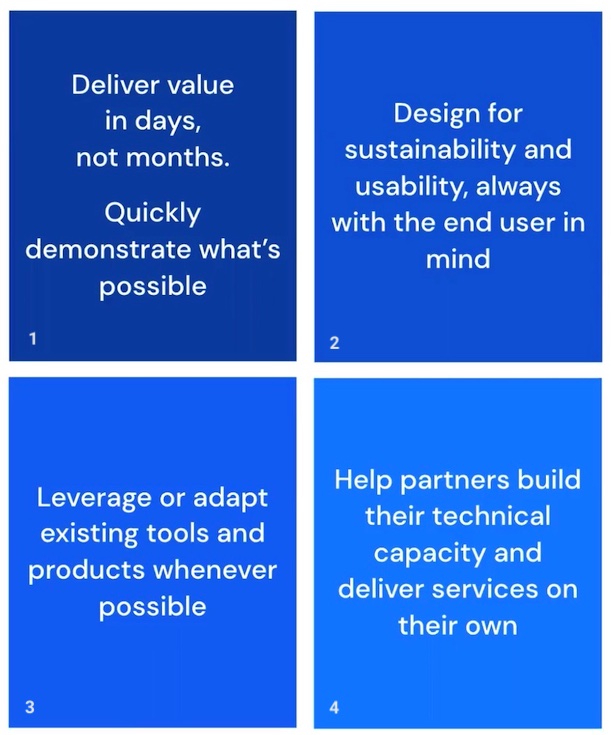
1. Deliver value in days, not months. Quickly demonstrate what's possible.
2. Design for sustainability and usability, always with the end user in mind. 
3. Leverage or adapt existing tools and products whenever possible. 
4. Help partners build their technical capacity and deliver services on their own.

Let’s take a closer look at each of these:

Deliver in values in days, not months. This isn’t possible for every project, tech-related or not. But it’s always worth thinking about: is there a small win that could be achieved early in a project that, ultimately, will take longer and will quickly demonstrate what’s possible, show why this is worth doing, etc.? If the project will take a long time, could small wins every few weeks be built into the project development?

Design for sustainability and usability, always with the end user in mind. Can I get an amen?! I feel so strongly about this, it really should be number one. To me, sustainability means that what you create can be taken over by the regular staff, whether employees or volunteers, when you, the person designing and implementing this, move on. If that’s not possible, IT’S NOT WORTH DOING. And to do this means you have focused on usability.

Leverage or adapt existing tools and products whenever possible. The first thing I do when I go into an organization is to access what they have in terms of software, hardware, forms and processes. I do NOT go in and start switching whatever they are using for document-sharing, live chat, photo-sharing with the public, donor tracking, etc. The organization MAY have all that they need – they just need to improve how they use it.

Help partners build their technical capacity and deliver services on their own. This, to me, links back to my comment about sustainability.

Of course, all of this is easier said than done. The biggest thing that has affected the success of my own change-based projects at an organization is a leader suddenly changing their mind about what they want and retreating into the but that’s the way we’ve always done it mentality. A lot of people say they want a change, or something new, but then balk when they see what that is really going to look like. I’m not sure what the process is to diplomatically ask, “You say this is what you want – but do you really?”

Also, I am always fascinated how a staff person or volunteer can have an idea for a new way of doing things and it’s rejected outright – but a consultant can suggest the same thing and it’s immediately endorsed and implemented. Before your organization looks for outside expertise, take an honest look inside – you may already have the inspiration, talent and energy you need among current staff.

Also see:

If you have benefited from this blog or other parts of my web site and would like to support the time that went into researching information, developing material, preparing articles, updating pages, etc. (I receive no funding for this work), here is how you can help.

Artificial Intelligence – friend or foe for nonprofits?

I thought about writing a blog addressing whether or not AI tools, like ChatGPT, are good or bad for nonprofits, NGOs, etc. But I think, indread, I’m just going to defer to all of the many discussions about AI on TechSoup, many of which I’ve participated in. I think reading these theards is helpful in seeing how complicated this question is and offers some important cautions for the use of these tools:

Leveraging Artificial Intelligence in Nonprofit Roles: A Step-by-Step Guide

Ethical Practices for Artificial Intelligence – a resource from SalesForce

Using AI as a text creator – how it went for me

Exploring the ethics of AI robots in volunteerism

UNESCO recommendations to combat gender bias in applications using artificial intelligence

Using Artificial Intelligence for Document and Email Automation

International Nonprofit Is Using Mentors To Help Girls Learn About Artificial Intelligence

World Health Organization issues guiding principles for AI design & use

Nonprofits & AI – How AI Is Helping Humanity

Film spotlights how AI can be a basis for racial and gender discrimination

Finding people, organizations & topics to follow on the Fediverse

Mastodon logo

Nonprofits, non-government organizations (NGOs), community groups, government agencies, libraries and other mission-based organizations, as well as consultants for such, should always be ready to explore a new way to connect with people. You don’t have to try out every tool, but when a certain number of colleagues or clients start talking about using something, it’s definitely time to have a look yourself. And right now, you should absolutely be exploring the Fediverse – Mastodon, specifically. I’ve said so why here.

Fedi.Tips posts hints and tips about Mastodon and the Fediverse, and I’ve found it quite helpful. This is from a recent post by FediTips on Mastodon:

There are many ways to discover interesting accounts on here. How many of these have you tried?

1. Follow hashtags
2. Join groups
3. Follow people, they share posts by others
4. Use FediFinder to discover Twitter people who are also on here
5. Browse directories
6. Follow curators
7. Browse trending posts & hashtags
8. Use StreetPass for Mastodon to discover website accounts on here
9. Hang out on Local & Federated timelines

More info on how to do all of these.

My own guidance about that first suggestion, about following hashtags: the way it’s supposed to work is that you do a search on a hashtag you want to follow, the posts that use those hashtags are supposed to come up, and then you click on the little figure with the plus sign in the upper right-hand corner to follow it. But when I did searches on terms I wanted to follow as hashtags, nothing came up. Finally, I just made a post that listed the hashtags I wanted to follow. And then after publishing I went to the post and, voilà, all my hashtags were now converted, with links – all I had to do was click on each and then click the follow button:

#volunteer
#volunteerism
#nonprofit
#NGO
#Tech4Good
#CommunityService
#a11y
#Inclusion
#MakeADifference
#history
#motorcycle
#travel
#hiking
#camping

Are you following any links on Mastodon that relate to your work or volunteering with nonprofits, government agencies, libraries or community groups? Which ones?

Personally, I’m enjoying Mastodon, just like I used to enjoy my personal Twitter account. But professionally – for connecting with colleagues, people working in similar fields, building a professional rep that leads to clients – so far, it’s been quite a dud: can’t find many people to follow, professionally-related topics aren’t happening. What about you?

Also see:

cover of Virtual Volunteering book with hands raising up various Internet connected devices

For detailed information about leveraging online tools to support and involve volunteers, whether they provide their service onsite at your organization, onsite elsewhere, or online, get yourself a copy of The Last Virtual Volunteering Guidebook. Online platforms and social media channels come and go, but the recommendations here are timeless, and absolutely will work with social media platforms that have emerged since this book was published, like Mastodon and TikTok. You will not find a more detailed guide anywhere on this subject than than The Last Virtual Volunteering Guidebook. It’s available both as a traditional print publication and as a digital book.

If you have benefited from any of my blogs or other parts of my web site and would like to support the time that went into researching information, developing material, preparing articles, updating pages, etc. (I receive no funding for this work), here is how you can help.

An App for Good Being Derailed by An Ugly Rumor

A woman is hidden by the target she is holding up in front of her face.

It’s the latest example of a troubling pattern regarding social media apps, especially one designed to do good: a phone-based app starts to become widely popular, especially with young people, but then becomes beset by rumors – all unfounded – that it’s a front for sex trafficking.

It happened in May 2016 to the social app Down To Lunch, in 2018 to IRL, a social app that helps users plan in-person meetups and, in 2021, to WalkSafe, an app designed to help women gauge the safety of neighborhoods. And now it’s happening to the Gas app, a tool that lets high schoolers send praise to one another.

As this article in the Washington Post points out:

Gas has never been linked to any form of human trafficking, and the app’s very structure makes it impossible, experts say. The app has limited features, doesn’t track users’ locations and can’t be used to message someone. It’s a basic polling platform that allows users to vote anonymously on preset compliments to send to mutual connections.

The false information that the app is somehow tricking children into being trafficked has ricocheted across the internet. Teenagers have posted videos on TikTok and Snapchat saying the app trafficks minors. Parents have warned other parents. On Oct. 31, the Piedmont, Oklahoma, police department issued a statement warning parents about the app and encouraging them to check their kids’ phones and the post received hundreds of shares on Facebook. The police ultimately issued a tepid retraction. The Oktaha Public School system in Oklahoma posted an announcement on its Facebook page on Thursday claiming the Gas app tricks students into giving away their locations. Local media also latched onto the hoax and shared it as the truth.

That a police department, a school district and a TV station shared such an obvious lie is outrageous. I wouldn’t be surprised if some nonprofits have as well.

How sad that this Tech4Good tool, one designed to encourage civility and positivity, is under attack by people spreading lies online.

Related resources:

Myths about sex trafficking abound in the USA.

Examples of Folklore, Rumors (or Rumours), Urban Myths & Organized Misinformation Campaigns Interfering with Development & Aid/Relief Efforts & Elections. (note there are several examples of mobs who have murdered strangers visiting their towns under the mistaken belief that such were there to abduct children for organ harvesting)

You have an obligation to be truthful online.

If you have benefited from this blog, my other blogs, or other parts of my web site and would like to support the time that went into researching information, developing material, preparing articles, updating pages, etc. (I receive no funding for this work), here is how you can help. 
What marketable IT skills should be taught mobile-only users?

Someone online asked the following – they were asking about people in a particular developing country:

If you had to teach an IT skill (IT used in the very broad sense and including social media management, online chat support, microblogging) to a group of people whose only exposure to tech is their cellphones and social media platforms, in 16 half-day sessions, what would you pick? These should be skills that are in demand by employers and can give them a foot-in to work on platforms like Fiverr and Udemy.

I found the question interesting because, when it comes to online volunteering, finding roles where you use ONLY a smartphone are few and far between. Similary, I’ve never seen a paid job where all you need is a smart phone (but LOTS of scams implying there are such).

My answer was very different than everyone else’s. Here are the suggestions I made:

I would make sure they understood:

  • the basics of cutting and pasting, editing,
  • spell check with the free version of Grammarly, when something is online/in the cloud and when something is downloaded,
  • when something SHOULD be in the cloud versus when something is downloaded,
  • using a VPN,
  • keeping information safe online,
  • knowing what of your information should be private and what’s okay to be public,
  • how to protect privacy online and stay safe online and detect scams,
  • the basics of netiquette and
  • how to build trust online.

I would do a workshop on what an effective online video interactive meeting looks like versus an online panel or online presentation. I would show how YouTube, Vimeo and Facebook video work – how to post, how to “like” a video, how to set privacy settings for videos, how to moderate comments, and if possible on a phone (I’m not sure if it is), how to edit such. I would emphasize that online tools are fluid – what we use now might not be what we use in 10 years, and that’s okay, because what we learn and how we work now will just transfer over to whatever comes along.

What’s interesting is that the person didn’t really seem to like the answer. She found them too “basic.” My rebuttal, which I didn’t post on her original question, but will here:

The aforementioned skills are what I look for when hiring someone, and I find them severely lacking among both applicants and co-workers – especially co-workers under 35. Whether the role is social media management, web site design, database management or online counseling, all of the aforementioned skills are fundamental to an employee, consultant or volunteer’s success in that role – and when any of these skills are lacking, the work suffers and it reflects poorly not only on the person but the entire organization.

Basic or not, these are the essential skills 21st-century workers need to master, no matter where they are in the world. And way too many of them are falling short. When an applicant has these skills, they get hired and they FLOURISH, no matter what tech changes come along.

And for those in the USA: Happy Labor Day!

Also see:

Virtual Volunteering & Employability

If you have benefited from this blog, my other blogs, or other parts of my web site and would like to support the time that went into researching information, developing material, preparing articles, updating pages, etc. (I receive no funding for this work), here is how you can help. 

Facebook, Meta, Virtual Worlds – Benefits? Risks? Does Second Life offer lessons?

a screen capture of a webinar that took place in Second Life, an avatar-based virtual world.

An online multimedia platform that allows people to create an avatar for themselves and “live” in an online virtual world. Avatars interact with places, objects and other avatars, exploring the virtual world, meeting other residents, socializing, having business meetings, hosting events, participating in group activities, building, creating, shopping, collaborating, even trading virtual property and services with one another.

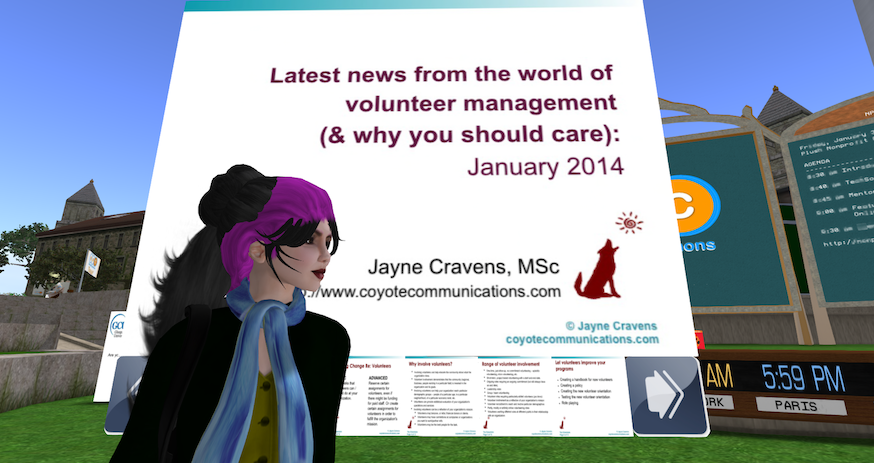
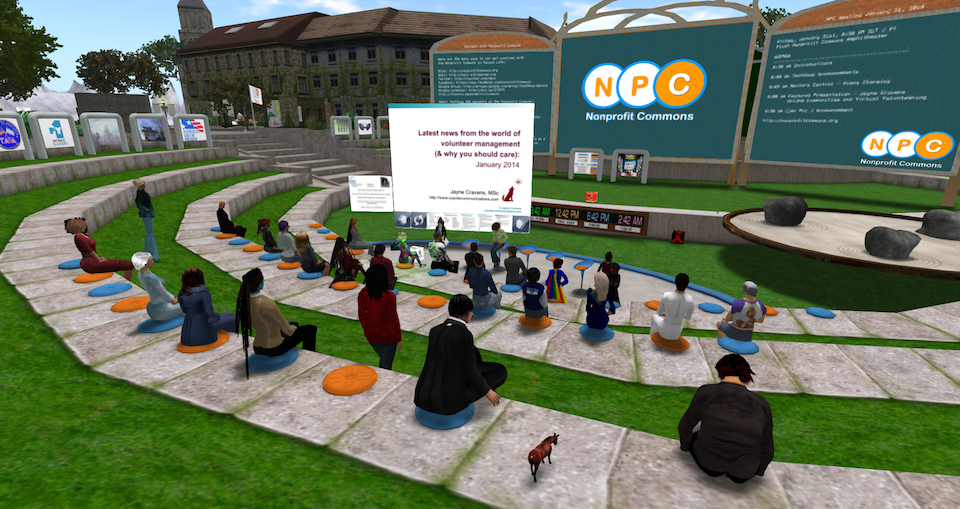
Mark Zuckerberg’s Metaverse? No! I’m talking about Second Life, which launched back in 2003. The image at the top of this blog, and the image below, are of me, as an avatar, leading an event in Second Life for TechSoup back in 2014:

An image of Jayne Cravens as an avatar in front of a giant silde from her event within Second Life.

TechSoup was an early and passionate adopter of Second Life, hosting numerous online events there. If you do a search for Second Life on the TechSoup forum, you would find numerous references to the platform and TechSoup activities there over the years.

Mark Zuckerberg, founder of Facebook (now Meta), said to much fanfare that he wanted to launch his own metaverse. The new virtual-reality app Horizon Worlds is Facebook’s first foray into the much-hyped “metaverse” for Facebook parent company Meta. Horizon Worlds, a beta version of which featured prominently in Zuckerberg’s announcement, launched Dec. 9 in the United States and Canada on the company’s Oculus virtual-reality platform and represents its first major attempt to deliver on his vision.

Were you on Second Life? Are you still on Second Life? Did you participate in TechSoup’s events on Second Life, or any other nonprofit-related activities? What do you think emerging virtual worlds, including Meta’s projects, can learn from Second Life? Comment below!

This article from The Duke Law Journal, The Development and Failure of Social Norms in Second Life, seems like something that the Meta folks should read. Its conclusion about Second Life:

Second Life is so thoroughly steeped in conditions that have impeded the development of successful social norms in other communities that any system of social norms in Second Life will ultimately fail. Because social norms will likely fail to successfully maximize resident welfare, regulatory schemes imposed both by the operators of the virtual world and by real-world governing institutions are needed to enhance the functioning of this particular alternative reality inhabited by millions.

Do you think Meta’s virtual world is addressing this issue? Do you think they need to plan for how to address such? And are you worried about safety at all with any online platforms? Comment below!

Nina Jane Patel was targeted with sexual harassment in Facebook/Meta’s platforms. “Within 60 seconds of joining — I was verbally & sexually harassed — 3–4 male avatars, with male voices, essentially, but virtually gang-raped my avatar & took photos…” The 43-year-old mother said it was such a “horrible experience that happened so fast” before she even had a chance to think about using “the safety barrier,” adding that she “froze.” She continued by confessing how both her “physiological and psychological” reaction was similar to it happening in real life. “Virtual reality has essentially been designed so the mind and body can’t differentiate virtual/digital experiences from real,” Patel wrote.

This is similar to assaults that happened in Second LIfe. Examples:

Horizon Worlds is supposed to be limited to adults 18 and older. In practice, however, very young kids appear to be among its earliest adopters. Some say the presence of children in Meta’s fledgling metaverse raises a grave concern: that by mixing children with adult strangers in a largely self-moderated virtual world, the company is inadvertently creating a hunting ground for sexual predators.

When new online forums arise that attract kids, sexual predators “are often among the first to arrive,” said Sarah Gardner, vice president of external affairs at Thorn, a tech nonprofit that focuses on protecting children from online sexual abuse. “They see an environment that is not well protected and does not have clear systems of reporting. They’ll go there first to take advantage of the fact that it is a safe ground for them to abuse or groom kids.”

More on safety for children in virtual worlds from the Washington Post.

Could nonprofits that engage in an online metaverse be putting their clients or others at risk by asking them to be there too? Comment below!

There’s one more consideration: accessibility. If you engage with people in a graphics-based environment, you are leaving out people who have sight-impairments. How will auditory displays work for graphics-based environments to address accessibility issues (I’m asking because I really don’t know)? Or is it a matter of ensuring you never limit your service delivery and volunteer engagement to only a graphics-based environment?

cover of Virtual Volunteering book with hands raising up various Internet connected devices

There is section devoted to virtual volunteering and avatar-based environments in The Last Virtual Volunteering Guidebook. The section offers some examples of nonprofits using Second Life to engage with clients and volunteers, and offers specific advice on how a nonprofit should get started using such environments, considerations to explore and pitfalls to avoid – all of which is relevant for any graphics-based virtual world. The rest of the book is easily adaptable to engaging with volunteers in graphics-based/avatar-based virtual worlds as well.

Looking forward to hearing your comments!

If you have benefited from this blog or other parts of my web site and would like to support the time that went into researching information, developing material, preparing articles, updating pages, etc. (I receive no funding for this work), here is how you can help.

Encouraging the Moldovan IT sector to prioritize online accessibility

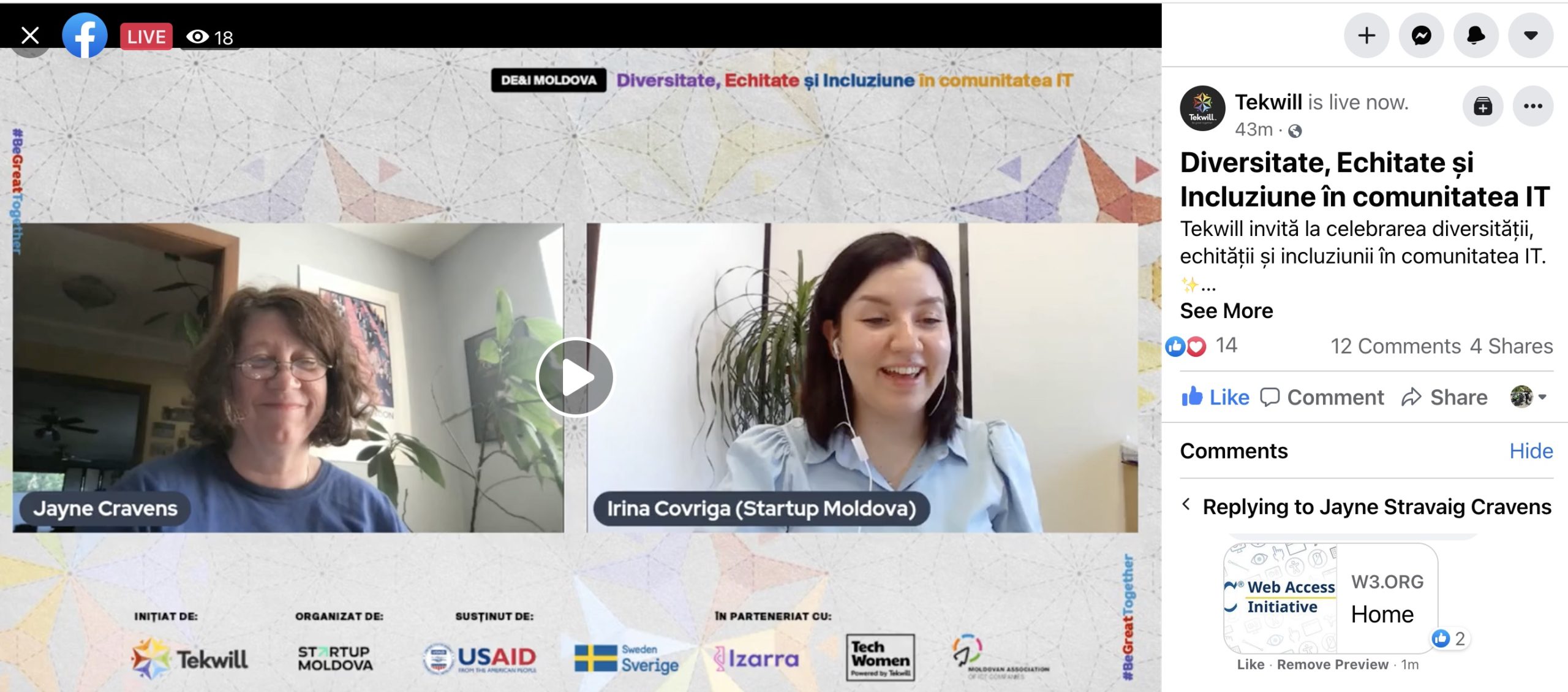
screen capture of the webinar with Jayne Cravens and the event host interacting on the screen

I spent 15 minutes early one morning last week talking to IT professionals in Moldova about how accessibility online makes the world a better place for everyone. The opportunity came about thanks to a colleague I worked with at the United Nations who now works for the Swedish Swedish Ministry for Foreign Affairs in Moldova. It was part of an initiative her government, and USAID, supported in Moldova regarding Diversitate, Echitate și Incluziune în comunitatea IT (Diversity, Equity and Inclusion in the IT community), an initiative of Tekwill, organized by Startup Moldova and in partnership with Izarra, TechWomen Moldova and the Moldovan Association of Information and Communications Technology Companies.

Evenimentul reunește antreprenori locali pentru a încuraja și abilita participanții să-și împărtășească ideile fără limite sau frica de a fi judecați dar și să manifeste mai multă atenție privind respectarea normelor și etichetei culturale din regiune – credințe, convingeri, ținută sau obiceiuri.

The event brings together local entrepreneurs to encourage and empower participants to share their ideas without limits or fear of being judged but also to pay more attention to respecting the rules and cultural etiquette of the region – beliefs, beliefs, dress or customs.

Located in the heart of the Technical University of Moldova (UTM), “Tekwill is a 4,000m² hub that has everything one would ever need for ongoing growth, from co-working spaces, tech labs (IoT, 3D printing) and community events.”

Tekwill is built on the belief that to be competitive economically in the years to come, Moldovan startups and innovators must begin adopting and creating industry-disrupting technology today. Therefore, this message was coded into our name; “Tek” – for technology and “will” – for our future. The organization regularly gathers local and international tech leaders to empower the development of Moldova’s startup ecosystem by facilitating results-oriented innovation and collaboration.

You can view my portion of the event, in English, on YouTube at around the 26:05 mark or via this Facebook page, at about the 26:10 mark. Introduction in Romanian.

I’m very partial to Moldova, having met some wonderful young Moldavians in 2019 hosted by World Oregon (I did a workshop on countering misinformation online). I have always found a very electrifying entrepreneurial, optimistic spirit among young Eastern Europeans, particularly from Moldova, Ukraine and Poland – people ready to innovate, to include, to explore and to create. I so long for the days when we can travel again so we call meet up face-to-face again!

One of the many things I’m proud of in The Last Virtual Volunteering Guidebook, is that it features an entire chapter on accessibility and diversity. I’ve been advocating for accessibility online since 1994 – and I’m going to keep doing it!

Also see:

If you have benefited from this blog or other parts of my web site or my YouTube videos and would like to support the time that went into researching information, developing material, preparing articles, updating pages, etc. (I receive no funding for this work), here is how you can help. 
Microsoft shutting down Academic Search and Related Services

Lots of folks online are upset at the news that Microsoft is planning plan to shut down its Microsoft Academic Search at the end of 2021. As one blogger put it, “it provides/provided better results than Google Scholar along with a number of features GS doesn’t provide at all” and has been “wonderful and powerful.”

It’s not that there aren’t other services – there are a number of other academic research search tools, many of them free. Some include bibliographic information/direct links to open access articles as well as bibliographic info about paywalled materials. Others, provide material only about open access content. These include:

There’s also alerting services from Semantic Scholar offers (free).

I rely heavily on these services, both to find resources to add to my list of virtual volunteering-related research on the Virtual Volunteering Wiki and to find out who might be quoting my book, The LAST Virtual Volunteering Guidebook, or any of my other research or academic work, in their own research. And without a university account, I don’t have access to most academic research journals – I can read only the summary of articles on the aforementioned services.

Which of these services – or some other – is your favorite? Will the Microsoft change affect you and, if so, how?

Apps4Good should be based in reality, not be tech fluff

I sent out this tweet thread December 3 from my Twitter account:

Listened to a podcast by someone wanting to develop an app to address a particular community need. He has no stats regarding the need, no research showing his approach is what partner agencies or potential clients want. Just talked about #app4good he’ll develop. (1/5) #CSR

This project leader has no experience regarding this particular community need. None. It’s another case of someone from the corporate world deciding that he knows what nonprofits or at-risk community members need, with no data or research to back that up. (2/5)

Looked at the web site. It’s very slick, uses all the buzzwords. You have to really read (which most folks won’t) to realize every project is in development, that no people with actual expertise in this issue are involved in this supposed nonprofit effort. (3/5)

It’s great that folks from the corporate / business / tech world want to help with community issues. Your involvement is vital. But just as you have to do your homework before developing an app for consumers, you have to do research before you develop an #app4good. #CSR (4/5)

Years of experience in the tech sector doesn’t prepare app creators for addressing homelessness, hunger or street harassment, or navigating mass transit, or working in emergencies. You must talk in-depth with the experts: nonprofits & their clients. (5/5)

I’ve written a LOT about how folks from the corporate world, from executive directors to app developers, don’t talk to nonprofits before they develop tech tools for their clients. Here’s more:

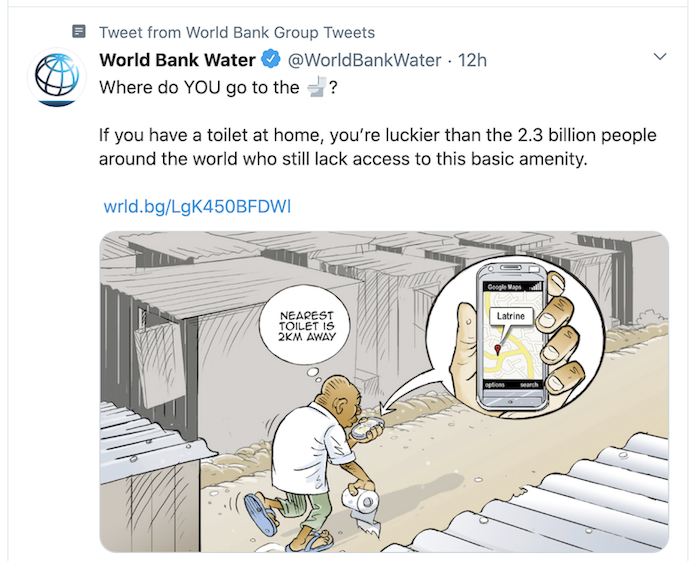
And then there is this brilliant tweet from World Bank Water, an initiative of the World Bank:

To paraphrase a comment I wrote in a previous blog, it’s wonderful to see so many tech4good / apps4good / hacks4good initiatives anywhere in the world, but I see way too much attention being spent on their launch, on their promise, and not nearly enough researching if this is really what clients or the community wants, let alone evaluating their impact and sustainability after launch. And if we don’t focus on those things, then they are just tech fluff.

A senior neighbor with intellectual disabilities gets an iPad

I live two doors down from a home for adults with intellectual disabilities, most of them over 40 years old. Some residents are on the autism spectrum, some have Down’s Syndrome, and some have brain damage from birth. They are terrific neighbors: kind, observant and friendly. And a couple of them are my friends: we sit together on the low wall around my front yard and interact with my dog and the various neighborhood dogs and cats that pass by – and the people, but always from a safe distance, as this is a group of people who are particularly vulnerable to the novel coronavirus.

Because of the danger of COVID-19, most of the residents can’t do the daily things that have brought them joy: one that had a job has now lost it because there isn’t enough work. They can’t go to church. They can’t go to the bottle drop center to recycle bottles and cans, something they enjoyed as much for the social aspect as the money. They can’t walk through Goodwill or Walmart. They can’t take mass transit. There are no public festivals. There are few garage sales. And their favorite shows, Live PD and Cops, have been canceled.

A month ago, a sister of one of the residents I’m particularly close to decided to buy him an iPad, so he could watch the church services he’s dearly missing because of the global pandemic, as well as watch videos like the dog videos I regularly record and share on YouTube. I volunteered to try to set it up in such a way that her brother could more easily navigate it. My goal was that, once someone logged into the iPad for him, he could watch the videos he wanted to without someone having to load a video each time. What I imagined was that there’s a particular time of day – let’s say 10 a.m. – when a staff person would log on to the device for him and, from there, he would have just a few clicks to watch and re-watch the videos pre-selected for him, and he could do that for, say, an hour on his own. It was tough to set up: he cannot read, so everything has to be done by easy-to-recognize icons. I don’t think he can remember more than two steps on a device. There can’t be too many things to click on – it will just be a sea of confusing symbols. He’s over 70 and has no experience using any device other than turning a device on or off or changing TV channels manually (he can’t use a remote and a phone is much too complicated for him to operate, even to call someone).

I spent hours looking at the Internet trying to find apps he would enjoy as well, but all seemed too advanced for him. Everything I read about online about apps that people with intellectual disabilities can use required a level of remembering and understanding and reading he just doesn’t have. There are lots of resources for parents to find apps to help their children with intellectual disabilities use an iPad or Android, and there are lots of resources to help people help elderly people use these devices, but resources to help seniors with intellectual disabilities use these devices? THAT has been a fruitless quest.

Here’s how I set it up:

  • I made three web pages, which are on my own web site, so that I can change them from my own home, without having to take his device back. I have a shortcut to the home page for these pages on the iPad, in the top left corner of the main screen. I wish I could have made the icon a cat or a dog, two images he easily recognizes, but I never could figure out how. The icon also has his name on it, which he does recognize.
  • I made the icons on the iPad as large as I could (and even then I wish I could have made them larger).
  • I moved all the icons off the first screen that I don’t want him to use. I left the icon to the web page that I created as his main interface, as well as the shortcuts to YouTube, kids’ YouTube, FaceTime, Zoom, his contacts and the camera button.
  • I created accounts for him on Google (for YouTube and gmail) and Facebook, and automatic logins for such. He will not use email, but he needed an email account in order to have accounts on things like video-conferencing software his sister might want to use to communicate with him.
  • After someone signs him in, he clicks on the icon with his name on it and he will come to a web page with three photos on it. One is of his church, one is of his pastor and one is of me. If he clicks on the church photo, he goes to a long list of links that go to church videos on Facebook. If he clicks on the photo of his pastor, he goes to a long list of links to videos his pastor has made, some on Facebook and some on YouTube (singing, puppet ministry, etc.). And if he clicks on the photo of me, he goes to a long list of my animal videos and silly videos on YouTube. He clicks on a link and pushes the play icon, and can watch the video.

Here’s the problem: after the video is done, he doesn’t have the capacity to navigate Facebook or YouTube and go to the next video. Instead, he has to remember to push the home button at the bottom of the device. Then he starts all over: clicking on “his” icon, coming to the web page with the three photos, choosing which “channel” of videos he wants to view, and then choosing a video to watch.

So, how is it going? I can’t observe him using it, and I wasn’t able to train him myself on using it. But in the evenings, I have been sitting out on my wall, talking with the pastor’s wife sitting eight feet away, and my neighbor has come walking over to say, “I saw you on that box thing!” He then recounts seeing her or her daughters singing or her husband preaching. I don’t know how often he watches videos on it, but it seems to be enough to delight him a few times a week. And as we all stay home day after day, being delighted a few times a week is the best we can hope for.

I hope it continues to work out for him. But either no one is thinking about people like him in the development of apps and interfaces, or they are but they’ve made those tools extremely hard to find.

If you have benefited from this blog or other parts of my web site and would like to support the time that went into researching information, developing material, preparing articles, updating pages, etc. (I receive no funding for this work), here is how you can help.